


yuchen20/memory-plus

yuchen20/memory-plus

от yuchen20
Memory-Plus - MCP сервер с локальным RAG для записи и поиска заметок и контекста. Визуализация связей между воспоминаниями. Полезен для долговременной памяти ассистентов.

memory_plus

pretty image

License: MIT visitors PyPI version PyPI Downloads

Memory-Plus

A lightweight, local Retrieval-Augmented Generation (RAG) memory store for MCP agents. Memory-Plus lets your agent record, retrieve, update, and visualize persistent "memories"—notes, ideas, and session context—across runs.

🏆 First Place at the Infosys Cambridge AI Centre Hackathon!

Key Features

  • Record Memories:Save user data, ideas, and important context.
  • Retrieve Memories:Search by keywords or topics over past entries.
  • Recent Memories:Fetch the last N items quickly.
  • Update Memories:Append or modify existing entries seamlessly.
  • Visualize Memories:Interactive graph clusters revealing relationships.
  • File Import (since v0.1.2):Ingest documents directly into memory.
  • Delete Memories (since v0.1.2):Remove unwanted entries.
  • Memory for Memories (since v0.1.4):Now we use resources to teach your AI exactly when (and when not) to recall past interactions.
  • Memory Versioning (since v0.1.4):When memories are updated, we keep the old versions to provide a full history.
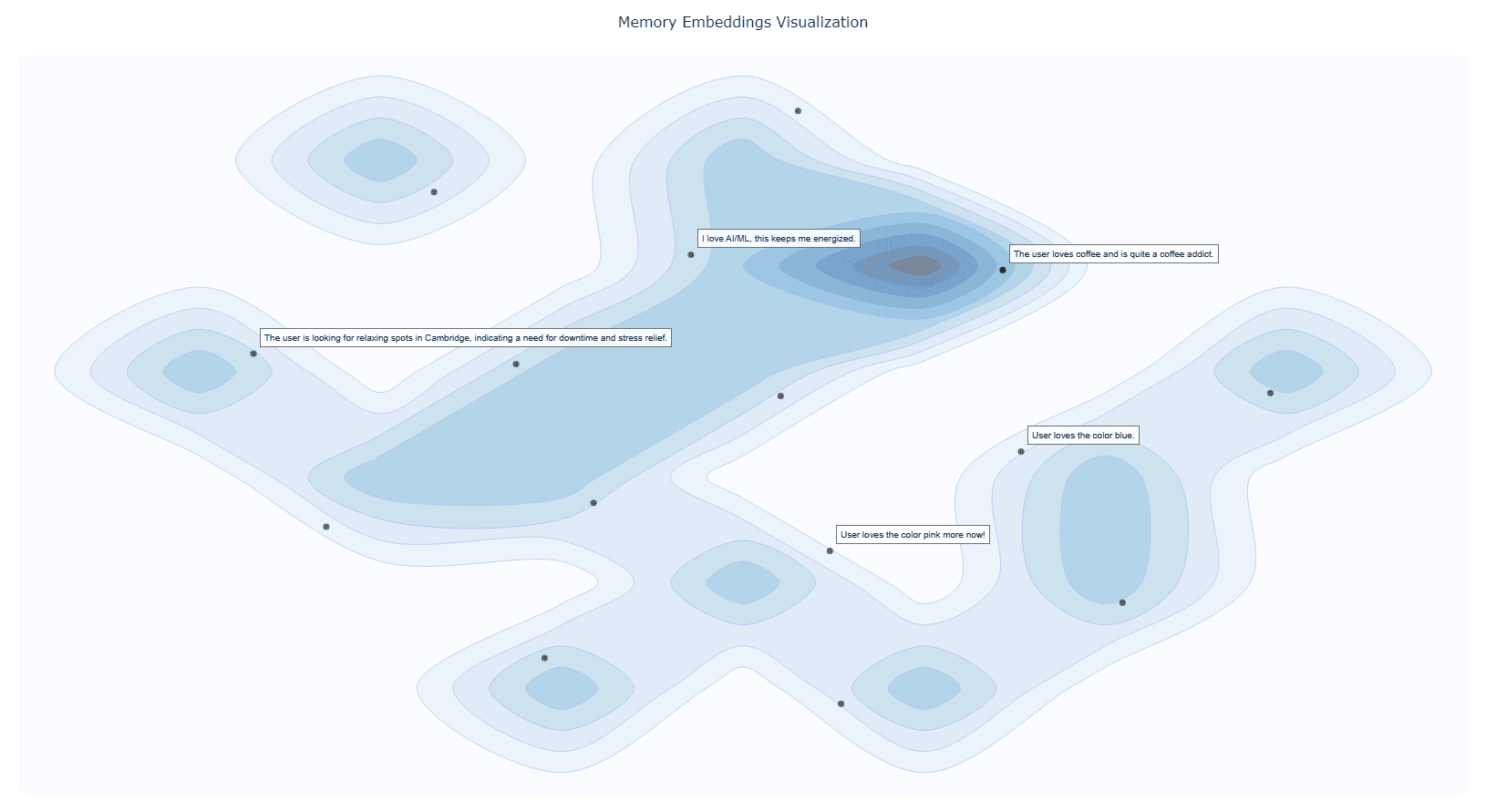
alt text

Installation

У этого сервера пока нет списка инструментов.
0.1.6основная
0.1.5
0.1.4
0.1.3
0.1.2
0.1.1
0.1.0

Выберите клиент, чтобы установить yuchen20/memory-plus:

Любой клиент

Конфиг добавления MCP сервера стандартный, обычно он не меняется вообще, поэтому подходит практически к любому ИИ клиенту, поддерживающему MCP.

{
  "mcpServers": {
    "yuchen20-memory-plus-7hej": {
      "command": "uvx",
      "args": [
        "-q",
        "memory-plus@latest"
      ]
    }
  }
}
CursorCursor

Перейдите по ссылке и сервер автоматически будет добавлен в Cursor. Либо откройте/создайте файл ~/.cursor/mcp.json(%USERPROFILE%\.cursor\mcp.json на Windows) и добавьте конфиг сервера:

{
  "mcpServers": {
    "yuchen20-memory-plus-7hej": {
      "command": "uvx",
      "args": [
        "-q",
        "memory-plus@latest"
      ]
    }
  }
}
VS Code

Создайте .vscode/mcp.json в проекте (ключ верхнего уровня — servers):

{
  "servers": {
    "yuchen20-memory-plus-7hej": {
      "type": "stdio",
      "command": "uvx",
      "args": [
        "-q",
        "memory-plus@latest"
      ]
    }
  }
}

Либо добавьте сервер через терминал:

code --add-mcp "{\"name\":\"yuchen20-memory-plus-7hej\",\"type\":\"stdio\",\"command\":\"uvx\",\"args\":[\"-q\",\"memory-plus@latest\"]}"
ClaudeClaude Desktop

Откройте Settings → Developer → Edit Config — это откроет файл claude_desktop_config.json:

  • macOS: ~/Library/Application Support/Claude/claude_desktop_config.json
  • Windows: %APPDATA%\Claude\claude_desktop_config.json

Впишите сервер и полностью перезапустите Claude Desktop:

{
  "mcpServers": {
    "yuchen20-memory-plus-7hej": {
      "command": "uvx",
      "args": [
        "-q",
        "memory-plus@latest"
      ]
    }
  }
}
Claude CodeClaude Code

Добавьте сервер одной командой в терминале:

claude mcp add yuchen20-memory-plus-7hej -- uvx -q memory-plus@latest

Либо через JSON-конфиг:

claude mcp add-json yuchen20-memory-plus-7hej "{\"command\":\"uvx\",\"args\":[\"-q\",\"memory-plus@latest\"]}"
CodexCodex

Добавьте сервер командой в терминале:

codex mcp add yuchen20-memory-plus-7hej -- uvx -q memory-plus@latest

Либо вручную в ~/.codex/config.toml(%USERPROFILE%\.codex\config.toml на Windows):

[mcp_servers.yuchen20-memory-plus-7hej]
command = "uvx"
args = ["-q", "memory-plus@latest"]
PerplexityPerplexity

MCP доступен подписчикам Perplexity Pro / Max / Enterprise. Локальные серверы — только в приложении для macOS.

  1. Откройте Настройки аккаунта → Connectors.
  2. Установите вспомогательное приложение PerplexityXPC (один раз).
  3. Нажмите Add Connector → вкладка Simple.
  4. В поле Server Name укажите yuchen20/memory-plus, а в поле команды запуска — строку ниже:
uvx -q memory-plus@latest

Нажмите Save и дождитесь статуса Running.

WindsurfWindsurf

Откройте Windsurf Settings → Cascade → MCP Servers или отредактируйте файл ~/.codeium/windsurf/mcp_config.json:

{
  "mcpServers": {
    "yuchen20-memory-plus-7hej": {
      "command": "uvx",
      "args": [
        "-q",
        "memory-plus@latest"
      ]
    }
  }
}
ClineCline

В панели Cline нажмите иконку MCP Servers → Configure → Configure MCP Servers (или отредактируйте ~/.cline/mcp.json) и добавьте сервер:

{
  "mcpServers": {
    "yuchen20-memory-plus-7hej": {
      "command": "uvx",
      "args": [
        "-q",
        "memory-plus@latest"
      ],
      "disabled": false,
      "autoApprove": []
    }
  }
}
Continue

Создайте файл в .continue/mcpServers/ (например yuchen20-memory-plus-7hej.yaml) или добавьте блок в config.yaml. MCP работает только в режиме agent:

mcpServers:
  - name: yuchen20-memory-plus-7hej
    command: uvx
    args:
      - "-q"
      - "memory-plus@latest"
Zed

Выполните agent: add context server или откройте настройки (zed: open settings file) и добавьте сервер в объект context_servers:

{
  "context_servers": {
    "yuchen20-memory-plus-7hej": {
      "command": "uvx",
      "args": [
        "-q",
        "memory-plus@latest"
      ]
    }
  }
}

Похожие MCP-сервера

VeriTeknik/pluggedin-mcp-proxy

VeriTeknik/pluggedin-mcp-proxy

официальный

от veriteknik

plugged.in MCP Hub — прокси-сервер, объединяющий множество MCP-серверов в один интерфейс. Он наделяет AI памятью, знаниями и инструментами, включает RAG-поиск, уведомления и управление документами. Работает с любыми MCP-клиентами.

TypeScript⭐ 136
elvismdev/mem0-mcp-selfhosted

elvismdev/mem0-mcp-selfhosted

от elvismdev

Self-hosted MCP сервер для долговременной памяти в Claude Code. Использует Qdrant, Neo4j и Ollama, поддерживает Anthropic или Ollama как LLM. 11 инструментов: добавление, поиск, удаление, граф связей.

Python⭐ 111
gzoonet/cortex

gzoonet/cortex

от gzoonet

Сервер GZOO Cortex — локальный граф знаний для разработчиков: мониторит файлы проектов, извлекает сущности и связи с помощью LLM. MCP инструмент для Claude Code с 12 инструментами позволяет задавать вопросы о проектах и выявлять противоречия прямо из диалога.

TypeScript⭐ 23
ndjordjevic/pinrag

ndjordjevic/pinrag

от ndjordjevic

PinRAG индексирует PDF, GitHub, YouTube, Discord и заметки в единый RAG-индекс. Задавайте вопросы из редактора — ответы с цитатами на источники. Полезен разработчикам и исследователям для работы с ...

Python⭐ 2
penfieldlabs/penfield-mcp

penfieldlabs/penfield-mcp

от penfieldlabs

MCP-сервер Penfield для долговременной памяти AI-агентов. Сохраняет решения, предпочтения и контекст между сессиями, строит граф знаний. Работает с Claude, Cursor, Windsurf и любыми MCP-инструментами.

Dockerfile⭐ 6
graphlit-mcp-server

graphlit-mcp-server

официальный

от graphlit

MCP сервер для Graphlit — превращает проект в RAG-базу знаний из данных Slack, Discord, Jira, GitHub, Google Drive. Работает в Cursor, Windsurf, Goose, Cline. Встроен веб-краулинг и веб-поиск.

TypeScript⭐ 377
© Каталог MCP, 2026. Все права защищены.
Проект не аффилирован с Anthropic и любыми упомянутыми продуктами.
Все названия и торговые марки принадлежат их владельцам.
Контакты для связи: hi@mcp-katalog.ru

Лука Никитин