
unibaseio/membase-mcp

unibaseio/membase-mcp

от unibaseio
Membase-MCP сервер даёт AI-агентам децентрализованную память на основе Unibase DA. Он сохраняет историю бесед и воспоминания, обеспечивая непрерывность и персонализацию. Разработчики используют его...

Membase

Membase

One memory. Every AI. Only yours.
Teach it once. Every AI remembers.

PyPI npm Proprietary

Website · Docs · Web app · Discord · X
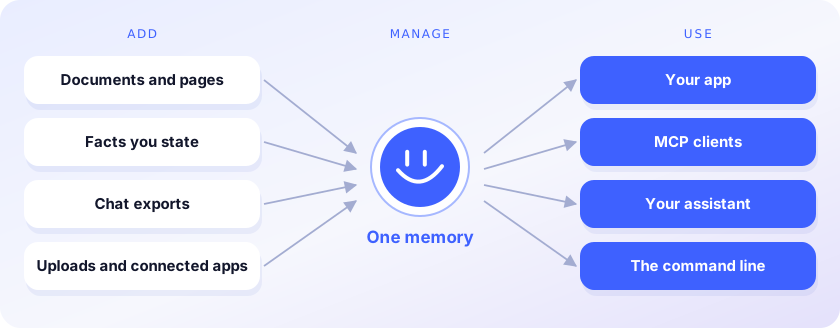
Add sources, manage one memory, use it from every AI and app

Membase is the memory layer for AI agents. It keeps one memory for everything you and your agents know, and every AI you use reads it. You stop re-explaining yourself each time you switch models or tools.

  • Add. Facts, documents, web pages and chat exports from Claude or ChatGPT go into one memory.
  • Manage. Containers keep projects apart; search it, ask it questions, forget what should go.
  • Use. Your code, Claude Code, Cursor, Codex and ChatGPT read the same memory through the SDK or MCP.

This repository is the developer side: Python and TypeScript clients, the membase command line and an MCP server. The memory lives in your Membase account, which the web app and browser extension also fill, or on your machine with unibaseio-membase[local].

Write once, read from any AI
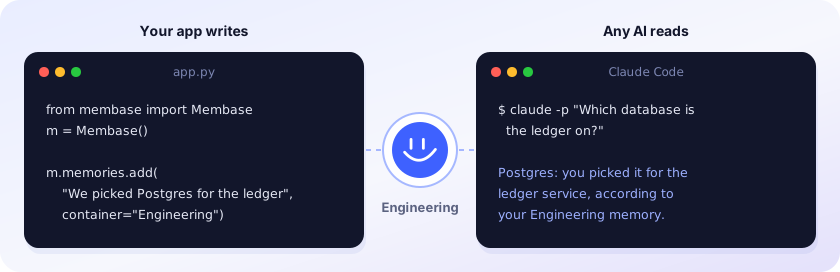
Your app writes a memory; any AI reads it, here Claude Code

Recordings: Python SDK (57 s) · Claude Code (1 min 33 s). The answer above is illustrative.

Accuracy

LoCoMo 93.1%, LongMemEval_S 92.6%, DMR 92.2%

93.1% on LoCoMo, 92.6% on LongMemEval_S and 92.2% on DMR, using about 3× fewer tokens than the full history on LoCoMo and 11× fewer on LongMemEval_S. Method and results: membase.ai/research

Часто задаваемые вопросы

У этого сервера пока нет списка инструментов.

Выберите клиент, чтобы установить unibaseio/membase-mcp:

Любой клиент

Конфиг добавления MCP сервера стандартный, обычно он не меняется вообще, поэтому подходит практически к любому ИИ клиенту, поддерживающему MCP.

{
  "mcpServers": {
    "unibaseio-membase-mcp-4hyqwrvpfx": {
      "command": "uv",
      "args": [
        "--directory",
        "path/to/membase-mcp",
        "run",
        "src/membase_mcp/server.py"
      ],
      "env": {
        "MEMBASE_ACCOUNT": "your account, 0x...",
        "MEMBASE_CONVERSATION_ID": "your conversation id, should be unique",
        "MEMBASE_ID": "your sub account, any string"
      }
    }
  }
}
CursorCursor

Перейдите по ссылке и сервер автоматически будет добавлен в Cursor. Либо откройте/создайте файл ~/.cursor/mcp.json(%USERPROFILE%\.cursor\mcp.json на Windows) и добавьте конфиг сервера:

{
  "mcpServers": {
    "unibaseio-membase-mcp-4hyqwrvpfx": {
      "command": "uv",
      "args": [
        "--directory",
        "path/to/membase-mcp",
        "run",
        "src/membase_mcp/server.py"
      ],
      "env": {
        "MEMBASE_ACCOUNT": "your account, 0x...",
        "MEMBASE_CONVERSATION_ID": "your conversation id, should be unique",
        "MEMBASE_ID": "your sub account, any string"
      }
    }
  }
}
VS Code

Создайте .vscode/mcp.json в проекте (ключ верхнего уровня — servers):

{
  "servers": {
    "unibaseio-membase-mcp-4hyqwrvpfx": {
      "type": "stdio",
      "command": "uv",
      "args": [
        "--directory",
        "path/to/membase-mcp",
        "run",
        "src/membase_mcp/server.py"
      ],
      "env": {
        "MEMBASE_ACCOUNT": "your account, 0x...",
        "MEMBASE_CONVERSATION_ID": "your conversation id, should be unique",
        "MEMBASE_ID": "your sub account, any string"
      }
    }
  }
}

Либо добавьте сервер через терминал:

code --add-mcp "{\"name\":\"unibaseio-membase-mcp-4hyqwrvpfx\",\"type\":\"stdio\",\"command\":\"uv\",\"args\":[\"--directory\",\"path/to/membase-mcp\",\"run\",\"src/membase_mcp/server.py\"],\"env\":{\"MEMBASE_ACCOUNT\":\"your account, 0x...\",\"MEMBASE_CONVERSATION_ID\":\"your conversation id, should be unique\",\"MEMBASE_ID\":\"your sub account, any string\"}}"
ClaudeClaude Desktop

Откройте Settings → Developer → Edit Config — это откроет файл claude_desktop_config.json:

  • macOS: ~/Library/Application Support/Claude/claude_desktop_config.json
  • Windows: %APPDATA%\Claude\claude_desktop_config.json

Впишите сервер и полностью перезапустите Claude Desktop:

{
  "mcpServers": {
    "unibaseio-membase-mcp-4hyqwrvpfx": {
      "command": "uv",
      "args": [
        "--directory",
        "path/to/membase-mcp",
        "run",
        "src/membase_mcp/server.py"
      ],
      "env": {
        "MEMBASE_ACCOUNT": "your account, 0x...",
        "MEMBASE_CONVERSATION_ID": "your conversation id, should be unique",
        "MEMBASE_ID": "your sub account, any string"
      }
    }
  }
}
Claude CodeClaude Code

Добавьте сервер одной командой в терминале:

claude mcp add unibaseio-membase-mcp-4hyqwrvpfx --env MEMBASE_ACCOUNT=your account, 0x... --env MEMBASE_CONVERSATION_ID=your conversation id, should be unique --env MEMBASE_ID=your sub account, any string -- uv --directory path/to/membase-mcp run src/membase_mcp/server.py

Либо через JSON-конфиг:

claude mcp add-json unibaseio-membase-mcp-4hyqwrvpfx "{\"command\":\"uv\",\"args\":[\"--directory\",\"path/to/membase-mcp\",\"run\",\"src/membase_mcp/server.py\"],\"env\":{\"MEMBASE_ACCOUNT\":\"your account, 0x...\",\"MEMBASE_CONVERSATION_ID\":\"your conversation id, should be unique\",\"MEMBASE_ID\":\"your sub account, any string\"}}"
CodexCodex

Добавьте сервер командой в терминале:

codex mcp add unibaseio-membase-mcp-4hyqwrvpfx --env MEMBASE_ACCOUNT=your account, 0x... --env MEMBASE_CONVERSATION_ID=your conversation id, should be unique --env MEMBASE_ID=your sub account, any string -- uv --directory path/to/membase-mcp run src/membase_mcp/server.py

Либо вручную в ~/.codex/config.toml(%USERPROFILE%\.codex\config.toml на Windows):

[mcp_servers.unibaseio-membase-mcp-4hyqwrvpfx]
command = "uv"
args = ["--directory", "path/to/membase-mcp", "run", "src/membase_mcp/server.py"]

[mcp_servers.unibaseio-membase-mcp-4hyqwrvpfx.env]
MEMBASE_ACCOUNT = "your account, 0x..."
MEMBASE_CONVERSATION_ID = "your conversation id, should be unique"
MEMBASE_ID = "your sub account, any string"
PerplexityPerplexity

MCP доступен подписчикам Perplexity Pro / Max / Enterprise. Локальные серверы — только в приложении для macOS.

  1. Откройте Настройки аккаунта → Connectors.
  2. Установите вспомогательное приложение PerplexityXPC (один раз).
  3. Нажмите Add Connector → вкладка Simple.
  4. В поле Server Name укажите unibaseio/membase-mcp, а в поле команды запуска — строку ниже:
uv --directory path/to/membase-mcp run src/membase_mcp/server.py

Нажмите Save и дождитесь статуса Running.

WindsurfWindsurf

Откройте Windsurf Settings → Cascade → MCP Servers или отредактируйте файл ~/.codeium/windsurf/mcp_config.json:

{
  "mcpServers": {
    "unibaseio-membase-mcp-4hyqwrvpfx": {
      "command": "uv",
      "args": [
        "--directory",
        "path/to/membase-mcp",
        "run",
        "src/membase_mcp/server.py"
      ],
      "env": {
        "MEMBASE_ACCOUNT": "your account, 0x...",
        "MEMBASE_CONVERSATION_ID": "your conversation id, should be unique",
        "MEMBASE_ID": "your sub account, any string"
      }
    }
  }
}
ClineCline

В панели Cline нажмите иконку MCP Servers → Configure → Configure MCP Servers (или отредактируйте ~/.cline/mcp.json) и добавьте сервер:

{
  "mcpServers": {
    "unibaseio-membase-mcp-4hyqwrvpfx": {
      "command": "uv",
      "args": [
        "--directory",
        "path/to/membase-mcp",
        "run",
        "src/membase_mcp/server.py"
      ],
      "env": {
        "MEMBASE_ACCOUNT": "your account, 0x...",
        "MEMBASE_CONVERSATION_ID": "your conversation id, should be unique",
        "MEMBASE_ID": "your sub account, any string"
      },
      "disabled": false,
      "autoApprove": []
    }
  }
}
Continue

Создайте файл в .continue/mcpServers/ (например unibaseio-membase-mcp-4hyqwrvpfx.yaml) или добавьте блок в config.yaml. MCP работает только в режиме agent:

mcpServers:
  - name: unibaseio-membase-mcp-4hyqwrvpfx
    command: uv
    args:
      - "--directory"
      - "path/to/membase-mcp"
      - "run"
      - "src/membase_mcp/server.py"
    env:
      MEMBASE_ACCOUNT: your account, 0x...
      MEMBASE_CONVERSATION_ID: your conversation id, should be unique
      MEMBASE_ID: your sub account, any string
Zed

Выполните agent: add context server или откройте настройки (zed: open settings file) и добавьте сервер в объект context_servers:

{
  "context_servers": {
    "unibaseio-membase-mcp-4hyqwrvpfx": {
      "command": "uv",
      "args": [
        "--directory",
        "path/to/membase-mcp",
        "run",
        "src/membase_mcp/server.py"
      ],
      "env": {
        "MEMBASE_ACCOUNT": "your account, 0x...",
        "MEMBASE_CONVERSATION_ID": "your conversation id, should be unique",
        "MEMBASE_ID": "your sub account, any string"
      }
    }
  }
}

Похожие MCP-сервера

leesgit/claude-session-continuity-mcp

leesgit/claude-session-continuity-mcp

от leesgit

Автоматически сохраняет контекст между сессиями Claude Code — больше не нужно повторять настройки. Использует семантический поиск, захват ошибок и решений, делает работу непрерывной. Для разработчи...

TypeScript⭐ 7
Skitchy/rekindle

Skitchy/rekindle

от skitchy

MCP-сервер Rekindle решает проблему потери контекста AI-ассистента между сессиями. Он ориентирует в начале, захватывает структурированные записи в конце, сохраняет контекст при сжатии. Всё локально в SQLite, без API-ключей. Полезен разработчикам Claude Code для непрерывной работы.

TypeScript⭐ 5
timmx7/acheron-mcp-server

timmx7/acheron-mcp-server

от timmx7

MCP сервер Acheron даёт постоянную память, общую между Claude Chat, Code и Cowork. Сохраняй решения, ищи заметки и просматривай историю — всё локально, без облака. Полезен всем, кто хочет не терять контекст между сессиями.

TypeScript⭐ 7
AlekseiMarchenko/central-intelligence

AlekseiMarchenko/central-intelligence

от alekseimarchenko

MCP сервер Central Intelligence даёт AI-агентам долговременную память: сохраняйте факты и контекст между сессиями, делитесь знаниями между инструментами. Инструменты запоминания, поиска и контекста работают с Claude Code, Cursor и другими. Данные возвращаются дословно, без перезаписи.

TypeScript⭐ 3
Cartisien/engram-mcp

Cartisien/engram-mcp

от cartisien

MCP-сервер для постоянной семантической памяти AI-агентов. Хранит воспоминания в SQLite, ищет по смыслу через локальные эмбеддинги Ollama — без облака и API-ключей. Пять инструментов: remember, rec...

TypeScript⭐ 1
aitytech/agentkits-memory

aitytech/agentkits-memory

от aitytech

MCP сервер AgentKits Memory даёт AI-ассистентам постоянную память: сохраняет решения, паттерны и ошибки между сессиями. Всё хранится локально в SQLite, легко интегрируется с Claude Code, Cursor и д...

TypeScript⭐ 3
© Каталог MCP, 2026. Все права защищены.
Проект не аффилирован с Anthropic и любыми упомянутыми продуктами.
Все названия и торговые марки принадлежат их владельцам.
Контакты для связи: hi@mcp-katalog.ru

Лука Никитин
