evalstate/mcp-hfspace

evalstate/mcp-hfspace

от evalstate
MCP сервер для доступа к моделям Hugging Face Spaces. Поддерживает десятки задач — генерацию, распознавание, синтез — через единый MCP протокол. Идеален для интеграции с Claude Desktop. Использует Gradio эндпоинты, настройка минимальна.

mcp-hfspace MCP Server 🤗

Совет

You can access and configure Hugging Face MCP services directly at https://hf.co/mcp, including Gradio spaces.

This project has been superceded by the official Hugging Face MCP Server and Gradio MCP Endpoints.

Alternatively you can run hf-mcp-server locally as a STDIO Server, or with robust support for SSE, Streaming HTTP and Streaming HTTP JSON Mode. This also runs a local UI for selecting tools and endpoints and supports ToolListChangedNotifications too.

hf.co/mcp

image

mcp-hfspace

Read the introduction here llmindset.co.uk/resources/mcp-hfspace/

Connect to Hugging Face Spaces with minimal setup needed - simply add your spaces and go!

By default, it connects to black-forest-labs/FLUX.1-schnell providing Image Generation capabilities to Claude Desktop.
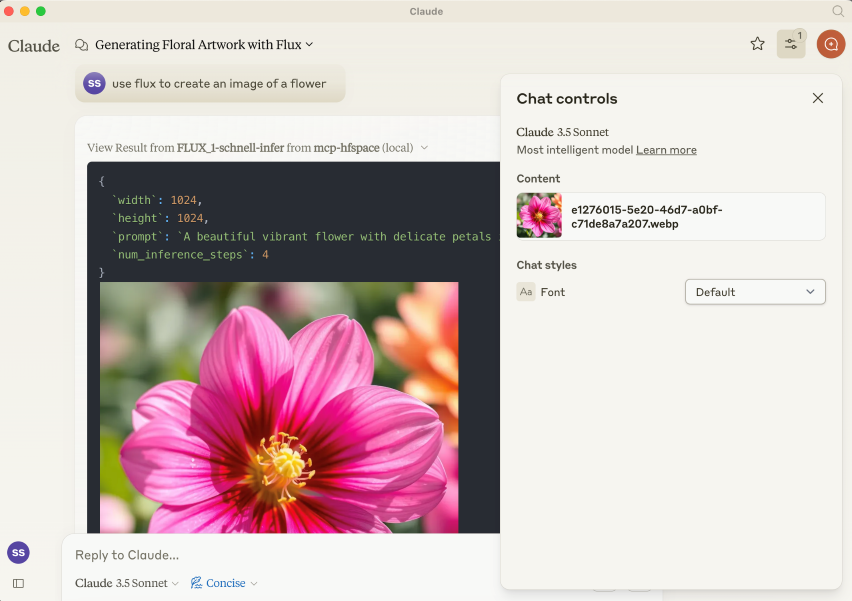
Default Setup

Gradio MCP Support

Совет

Gradio 5.28 now has integrated MCP Support via SSE: https://huggingface.co/blog/gradio-mcp. Check out whether your target Space is MCP Enabled!

Installation

NPM Package is @llmindset/mcp-hfspace.

Часто задаваемые вопросы

У этого сервера пока нет списка инструментов.
0.5.4основная
0.5.3
0.5.2
0.5.1
0.5.0
0.4.6
0.4.5
0.4.4
0.4.3
0.4.2
0.4.1
0.4.0
0.3.9
0.3.41
0.3.3
0.3.2

Выберите клиент, чтобы установить evalstate/mcp-hfspace:

Любой клиент

Конфиг добавления MCP сервера стандартный, обычно он не меняется вообще, поэтому подходит практически к любому ИИ клиенту, поддерживающему MCP.

{
  "mcpServers": {
    "evalstate-mcp-hfspace-pxhr9m6la8": {
      "command": "npx",
      "args": [
        "-y",
        "@llmindset/mcp-hfspace",
        "--work-dir=~/mcp-files/ or x:/temp/mcp-files/",
        "--HF_TOKEN=HF_{optional token}",
        "Qwen/Qwen2-72B-Instruct",
        "black-forest-labs/FLUX.1-schnell",
        "space/example/specific-endpint"
      ]
    }
  }
}
CursorCursor

Перейдите по ссылке и сервер автоматически будет добавлен в Cursor. Либо откройте/создайте файл ~/.cursor/mcp.json(%USERPROFILE%\.cursor\mcp.json на Windows) и добавьте конфиг сервера:

{
  "mcpServers": {
    "evalstate-mcp-hfspace-pxhr9m6la8": {
      "command": "npx",
      "args": [
        "-y",
        "@llmindset/mcp-hfspace",
        "--work-dir=~/mcp-files/ or x:/temp/mcp-files/",
        "--HF_TOKEN=HF_{optional token}",
        "Qwen/Qwen2-72B-Instruct",
        "black-forest-labs/FLUX.1-schnell",
        "space/example/specific-endpint"
      ]
    }
  }
}
VS Code

Создайте .vscode/mcp.json в проекте (ключ верхнего уровня — servers):

{
  "servers": {
    "evalstate-mcp-hfspace-pxhr9m6la8": {
      "type": "stdio",
      "command": "npx",
      "args": [
        "-y",
        "@llmindset/mcp-hfspace",
        "--work-dir=~/mcp-files/ or x:/temp/mcp-files/",
        "--HF_TOKEN=HF_{optional token}",
        "Qwen/Qwen2-72B-Instruct",
        "black-forest-labs/FLUX.1-schnell",
        "space/example/specific-endpint"
      ]
    }
  }
}

Либо добавьте сервер через терминал:

code --add-mcp "{\"name\":\"evalstate-mcp-hfspace-pxhr9m6la8\",\"type\":\"stdio\",\"command\":\"npx\",\"args\":[\"-y\",\"@llmindset/mcp-hfspace\",\"--work-dir=~/mcp-files/ or x:/temp/mcp-files/\",\"--HF_TOKEN=HF_{optional token}\",\"Qwen/Qwen2-72B-Instruct\",\"black-forest-labs/FLUX.1-schnell\",\"space/example/specific-endpint\"]}"
ClaudeClaude Desktop

Откройте Settings → Developer → Edit Config — это откроет файл claude_desktop_config.json:

  • macOS: ~/Library/Application Support/Claude/claude_desktop_config.json
  • Windows: %APPDATA%\Claude\claude_desktop_config.json

Впишите сервер и полностью перезапустите Claude Desktop:

{
  "mcpServers": {
    "evalstate-mcp-hfspace-pxhr9m6la8": {
      "command": "npx",
      "args": [
        "-y",
        "@llmindset/mcp-hfspace",
        "--work-dir=~/mcp-files/ or x:/temp/mcp-files/",
        "--HF_TOKEN=HF_{optional token}",
        "Qwen/Qwen2-72B-Instruct",
        "black-forest-labs/FLUX.1-schnell",
        "space/example/specific-endpint"
      ]
    }
  }
}
Claude CodeClaude Code

Добавьте сервер одной командой в терминале:

claude mcp add evalstate-mcp-hfspace-pxhr9m6la8 -- npx -y @llmindset/mcp-hfspace --work-dir=~/mcp-files/ or x:/temp/mcp-files/ --HF_TOKEN=HF_{optional token} Qwen/Qwen2-72B-Instruct black-forest-labs/FLUX.1-schnell space/example/specific-endpint

Либо через JSON-конфиг:

claude mcp add-json evalstate-mcp-hfspace-pxhr9m6la8 "{\"command\":\"npx\",\"args\":[\"-y\",\"@llmindset/mcp-hfspace\",\"--work-dir=~/mcp-files/ or x:/temp/mcp-files/\",\"--HF_TOKEN=HF_{optional token}\",\"Qwen/Qwen2-72B-Instruct\",\"black-forest-labs/FLUX.1-schnell\",\"space/example/specific-endpint\"]}"
CodexCodex

Добавьте сервер командой в терминале:

codex mcp add evalstate-mcp-hfspace-pxhr9m6la8 -- npx -y @llmindset/mcp-hfspace --work-dir=~/mcp-files/ or x:/temp/mcp-files/ --HF_TOKEN=HF_{optional token} Qwen/Qwen2-72B-Instruct black-forest-labs/FLUX.1-schnell space/example/specific-endpint

Либо вручную в ~/.codex/config.toml(%USERPROFILE%\.codex\config.toml на Windows):

[mcp_servers.evalstate-mcp-hfspace-pxhr9m6la8]
command = "npx"
args = ["-y", "@llmindset/mcp-hfspace", "--work-dir=~/mcp-files/ or x:/temp/mcp-files/", "--HF_TOKEN=HF_{optional token}", "Qwen/Qwen2-72B-Instruct", "black-forest-labs/FLUX.1-schnell", "space/example/specific-endpint"]
PerplexityPerplexity

MCP доступен подписчикам Perplexity Pro / Max / Enterprise. Локальные серверы — только в приложении для macOS.

  1. Откройте Настройки аккаунта → Connectors.
  2. Установите вспомогательное приложение PerplexityXPC (один раз).
  3. Нажмите Add Connector → вкладка Simple.
  4. В поле Server Name укажите evalstate/mcp-hfspace, а в поле команды запуска — строку ниже:
npx -y @llmindset/mcp-hfspace --work-dir=~/mcp-files/ or x:/temp/mcp-files/ --HF_TOKEN=HF_{optional token} Qwen/Qwen2-72B-Instruct black-forest-labs/FLUX.1-schnell space/example/specific-endpint

Нажмите Save и дождитесь статуса Running.

WindsurfWindsurf

Откройте Windsurf Settings → Cascade → MCP Servers или отредактируйте файл ~/.codeium/windsurf/mcp_config.json:

{
  "mcpServers": {
    "evalstate-mcp-hfspace-pxhr9m6la8": {
      "command": "npx",
      "args": [
        "-y",
        "@llmindset/mcp-hfspace",
        "--work-dir=~/mcp-files/ or x:/temp/mcp-files/",
        "--HF_TOKEN=HF_{optional token}",
        "Qwen/Qwen2-72B-Instruct",
        "black-forest-labs/FLUX.1-schnell",
        "space/example/specific-endpint"
      ]
    }
  }
}
ClineCline

В панели Cline нажмите иконку MCP Servers → Configure → Configure MCP Servers (или отредактируйте ~/.cline/mcp.json) и добавьте сервер:

{
  "mcpServers": {
    "evalstate-mcp-hfspace-pxhr9m6la8": {
      "command": "npx",
      "args": [
        "-y",
        "@llmindset/mcp-hfspace",
        "--work-dir=~/mcp-files/ or x:/temp/mcp-files/",
        "--HF_TOKEN=HF_{optional token}",
        "Qwen/Qwen2-72B-Instruct",
        "black-forest-labs/FLUX.1-schnell",
        "space/example/specific-endpint"
      ],
      "disabled": false,
      "autoApprove": []
    }
  }
}
Continue

Создайте файл в .continue/mcpServers/ (например evalstate-mcp-hfspace-pxhr9m6la8.yaml) или добавьте блок в config.yaml. MCP работает только в режиме agent:

mcpServers:
  - name: evalstate-mcp-hfspace-pxhr9m6la8
    command: npx
    args:
      - "-y"
      - "@llmindset/mcp-hfspace"
      - "--work-dir=~/mcp-files/ or x:/temp/mcp-files/"
      - "--HF_TOKEN=HF_{optional token}"
      - "Qwen/Qwen2-72B-Instruct"
      - "black-forest-labs/FLUX.1-schnell"
      - "space/example/specific-endpint"
Zed

Выполните agent: add context server или откройте настройки (zed: open settings file) и добавьте сервер в объект context_servers:

{
  "context_servers": {
    "evalstate-mcp-hfspace-pxhr9m6la8": {
      "command": "npx",
      "args": [
        "-y",
        "@llmindset/mcp-hfspace",
        "--work-dir=~/mcp-files/ or x:/temp/mcp-files/",
        "--HF_TOKEN=HF_{optional token}",
        "Qwen/Qwen2-72B-Instruct",
        "black-forest-labs/FLUX.1-schnell",
        "space/example/specific-endpint"
      ]
    }
  }
}

Похожие MCP-сервера

stabgan/openrouter-mcp-multimodal

stabgan/openrouter-mcp-multimodal

от stabgan

Мультимодальный MCP-сервер для анализа и генерации текста, изображений, аудио и видео. Интегрируется с Claude Desktop, Cursor и другими клиентами через OpenRouter, давая доступ к 300+ моделям. Вклю...

TypeScript⭐ 99
gwbischof/outsource-mcp

gwbischof/outsource-mcp

от gwbischof

Сервер Outsource MCP даёт AI-приложениям единый доступ к 20+ модельным провайдерам для генерации текста и изображений. Работает с любыми MCP-клиентами, включая Claude Desktop и Cline. Подходит разр...

Python⭐ 30
spranab/brainstorm-mcp

spranab/brainstorm-mcp

от spranab

MCP-сервер для мультимодельного мозгового штурма: запускает дебаты между GPT, Gemini, DeepSeek и Claude с автоматическим синтезом вердиктов. Полезен разработчикам и командам для быстрого получения ...

TypeScript⭐ 71
gpu-bridge/mcp-server

gpu-bridge/mcp-server

от gpu-bridge

MCP сервер GPU-Bridge предоставляет 30 GPU-сервисов как инструменты для ИИ-агентов: LLM, генерация изображений, аудио и другие. Поддерживает x402 для автономной оплаты без API ключей. Идеален для автономных AI агентов.

JavaScript⭐ 2
VrtxOmega/Ollama-Omega

VrtxOmega/Ollama-Omega

от vrtxomega

Ollama-Omega — MCP-сервер для интеграции локального AI в любую IDE. Через шесть готовых инструментов (чат, генерация, проверка здоровья и другие) работает с моделями Ollama без доступа в облако. По...

Python⭐ 4
strato-space/media-gen-mcp

strato-space/media-gen-mcp

от strato-space

Строго типизированный MCP сервер для генерации изображений (OpenAI gpt-image) и видео (Sora, Veo). Поддерживает редактирование, загрузку с URL и диска, сжатие. Интегрируется с любыми MCP-клиентами.

TypeScript⭐ 9
© Каталог MCP, 2026. Все права защищены.
Проект не аффилирован с Anthropic и любыми упомянутыми продуктами.
Все названия и торговые марки принадлежат их владельцам.
Контакты для связи: hi@mcp-katalog.ru

Лука Никитин