
Teradata MCP Server



Connect AI agents directly to Teradata with enterprise security and extensibility.
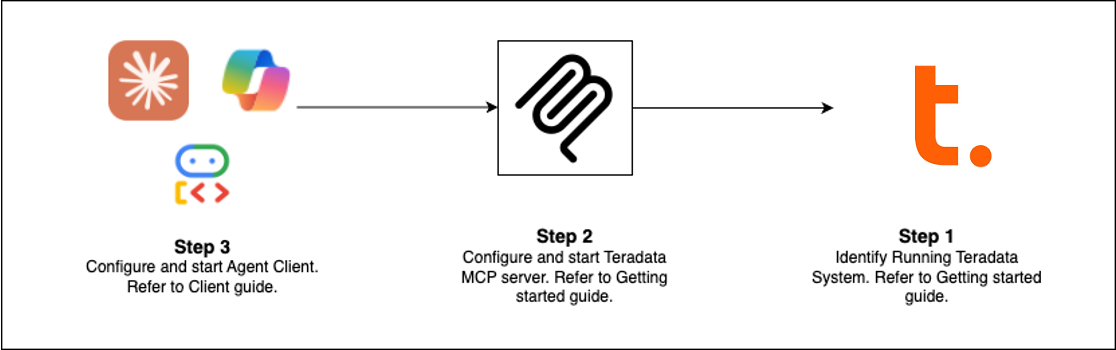
Quick Start (Choose Your Path)
| Client | Best For | Setup Time |
|---|---|---|
| Claude Desktop | Exploratory analysis, platform admin | 5 min |
| VS Code + Copilot | Data engineering, agent development | 5 min |
| Open WebUI | Testing new LLMs locally | 5 min |
| Code Examples | Build your own client | varies |
| Flowise | Visual agent builder | 10 min |
Pre-requisites: Teradata database (or free sandbox) + uv
Claude Desktop Setup (No Installation)
Add this to claude_desktop_config.json (Settings > Developer > Edit Config):
{
  "mcpServers": {
    "teradata": {
      "command": "uvx",
      "args": ["teradata-mcp-server"],
      "env": {
        "DATABASE_URI": "teradata://<USERNAME>:<PASSWORD>@<HOST_URL>:1025/<USERNAME>"
      }
    }
  }
}
What You Can Do
| Use Case | Capabilities | Tools |
|---|---|---|
| Query & Analyze | Explore tables, profile data, explain results, visualize patterns—no SQL needed | base, dba, qlty, plot |
| Semantic Layer | Generate custom semantic layers and tools from YAML or with our Agent Skill | Learn more → |
| AI & RAG Pipelines | Semantic search, retrieval-augmented generation, vector storage | rag, tdvs, fs |
| Database Admin | Manage security, monitor capacity, automate backups | dba, sec, bar |


