

smart-mcp-proxy/mcpproxy-go

smart-mcp-proxy/mcpproxy-go

от smart-mcp-proxy
MCPProxy — прокси-сервер для безопасного объединения сотен MCP инструментов. Он обходит лимиты Cursor и OpenAI, экономя токены. Встроенный карантин блокирует опасные серверы до проверки. Работает на всех платформах с единым бинарником и веб-интерфейсом.

MCPProxy — Supercharge AI Agents, Safely · One safe endpoint in front of every MCP server

Release Build Go Report Card Go Reference License: MIT GitHub stars OpenSSF Scorecard

MCPProxy web UI demo: server dashboard, tool discovery, activity log, and security quarantine

📺 Watch the full walkthrough  ·  📚 Read the docs  ·  🌐 mcpproxy.app

The demo above shows the embedded web UI. The MCPProxy core is a single binary for macOS, Linux, and Windows — the web UI ships inside it, with no extra service to run. On macOS, an optional menu‑bar app adds one‑click convenience (start/stop, server health, quarantine, logs).
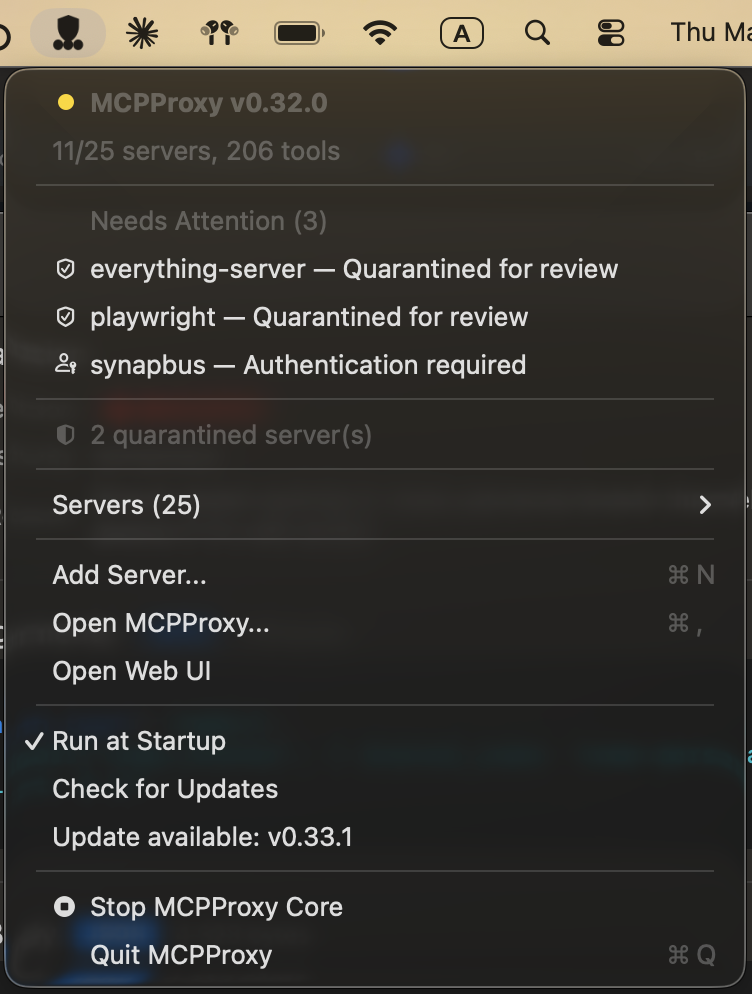
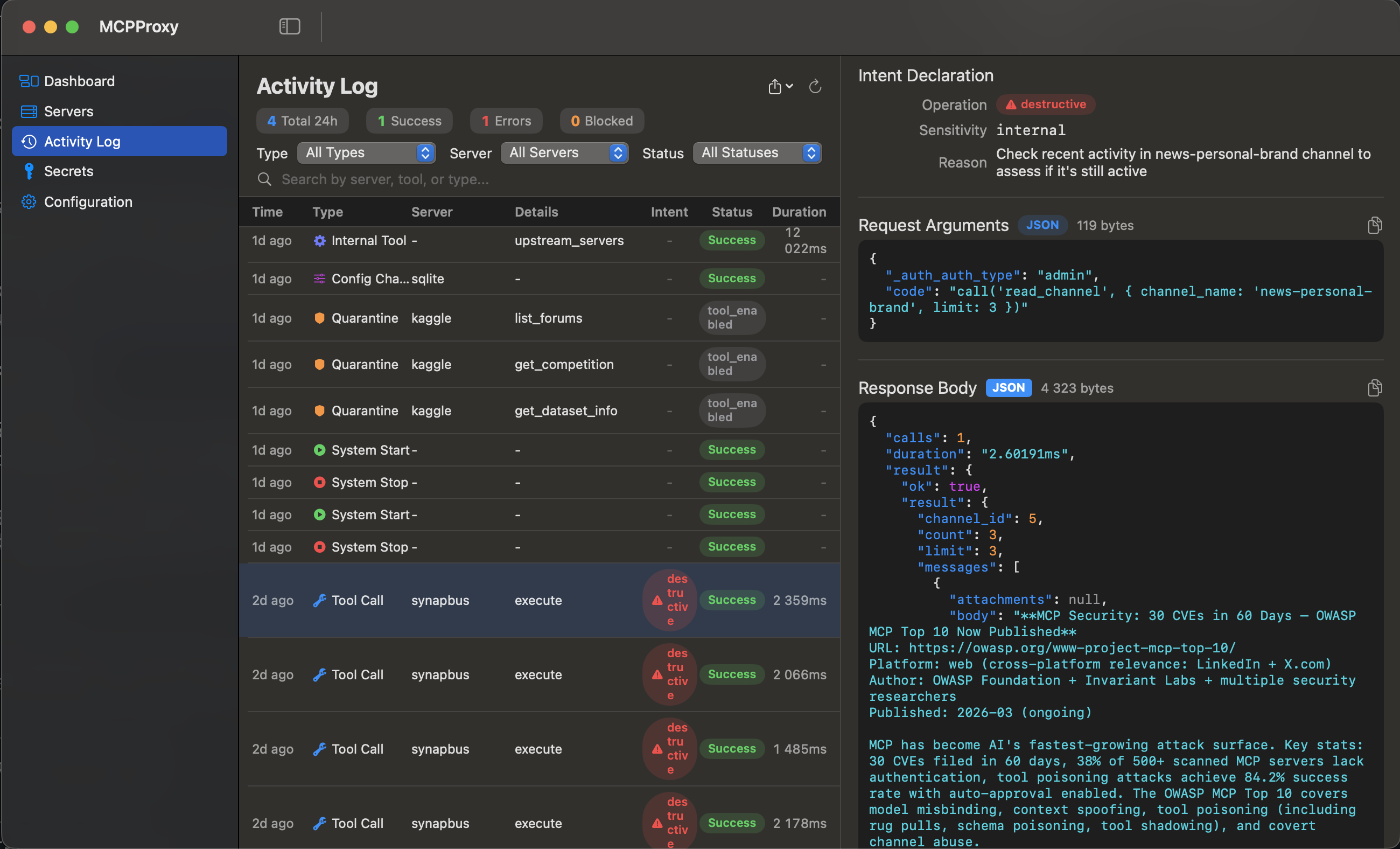
MCPProxy macOS menu-bar app      MCPProxy macOS app — Activity log with sensitive-data detection
macOS menu‑bar app   ·   Activity log & audit in the macOS app

Why MCPProxy?

  • Scale beyond API limits – Federate hundreds of MCP servers while bypassing Cursor's 40-tool limit and OpenAI's 128-function cap.
  • Spend less context on tool definitions – Agents see a small set of MCPProxy discovery and execution tools (retrieve_tools, describe_tool, the call_tool_* variants and a few management tools) instead of the full upstream tool catalog, and fetch schemas on demand (in retrieve_tools and code_execution routing; direct routing exposes upstream tools individually, see Routing modes). How much context this saves depends on the number of tools, the routing mode, the client and the task; see Token savings: what is and is not measured.
  • Review before use – New servers are quarantined and their tools are withheld from agents until you review and approve them, and, under the default manual trust mode, most later changes to an approved tool's definition are held for review again. Known exceptions: input-schema-only edits outside scan mode, a newly added output schema, and a description added to a tool that was approved with an empty description are admitted without a hold; scan mode admits clean changes and misses what its detectors miss; auto mode does not hold changes. This reduces exposure to malicious tool definitions (Tool Poisoning Attacks); it is not a guarantee of safety. See What quarantine does and does not cover.
  • Pluggable security scanners – Run Snyk, Semgrep, Trivy, Cisco, and other Docker-based scanners against quarantined servers before you approve them; findings are normalized to SARIF with a composite risk score. See Security scanner plugins.
  • Works offline & cross-platform – A single core binary for macOS (Intel & Apple Silicon), Windows (x64 & ARM64), and Linux (x64 & ARM64), with the web UI embedded. macOS additionally ships an optional menu-bar app.

Часто задаваемые вопросы

У этого сервера пока нет списка инструментов.
0.15.1основная
0.15.0
0.14.5
0.14.4
0.14.3
0.14.2
0.14.1
0.14.0
0.13.5
0.13.4
0.13.3
0.13.2
0.13.1
0.13.0
0.12.1
0.12.0
0.11.0
0.10.0
0.9.0
0.8.7
0.8.6
0.8.5
0.8.4
0.8.3
0.8.2
0.8.1
0.8.0
0.7.0
0.6.0
0.5.0
0.4.1
0.4.0
0.3.3
0.3.2
0.3.1
0.3.0
0.2.7
0.2.6
0.2.5
0.2.4
0.2.3
0.2.2
0.2.1
0.2.0
0.1.49
0.1.48
0.1.47
0.1.46
0.1.45
0.1.44
0.1.43
0.1.42
0.1.41
0.1.40
0.1.39
0.1.38
0.1.37
0.1.36
0.1.35
0.1.34
0.1.33
0.1.32
0.1.31
0.1.30
0.1.29
0.1.28
0.1.27
0.1.26
0.1.25
0.1.24
0.1.23
0.1.22
0.1.21
0.1.20
0.1.19
0.1.18
0.1.17
0.1.16
0.1.15
0.1.14
0.1.13
0.1.12
0.1.9
0.1.8
0.1.7
0.1.6
0.1.5
0.1.4
0.1.3
0.1.2
0.1.1
0.1.0
0.1.0-2
0.1.0-1
0.1.0-0
0.0.22
0.0.21
0.0.20
0.0.19
0.0.18
0.0.17
0.0.16
0.0.15
0.0.14
0.0.13
0.0.12
0.0.11
0.0.10
0.0.10-3
0.0.10-2
0.0.10-1
0.0.10-0
0.0.9
0.0.8
0.0.8-0
0.0.7
0.0.6
0.0.5
0.0.5-0
0.0.4
0.0.3
0.0.2
0.0.1

Выберите клиент, чтобы установить smart-mcp-proxy/mcpproxy-go:

Любой клиент

Конфиг добавления MCP сервера стандартный, обычно он не меняется вообще, поэтому подходит практически к любому ИИ клиенту, поддерживающему MCP.

{
  "mcpServers": {
    "smart-mcp-proxy-mcpproxy-go-wglwm37izh": {
      "command": "npx",
      "args": [
        "-y",
        "mcp-remote",
        "http://localhost:8080/mcp"
      ]
    }
  }
}
CursorCursor

Перейдите по ссылке и сервер автоматически будет добавлен в Cursor. Либо откройте/создайте файл ~/.cursor/mcp.json(%USERPROFILE%\.cursor\mcp.json на Windows) и добавьте конфиг сервера:

{
  "mcpServers": {
    "smart-mcp-proxy-mcpproxy-go-wglwm37izh": {
      "command": "npx",
      "args": [
        "-y",
        "mcp-remote",
        "http://localhost:8080/mcp"
      ]
    }
  }
}
VS Code

Создайте .vscode/mcp.json в проекте (ключ верхнего уровня — servers):

{
  "servers": {
    "smart-mcp-proxy-mcpproxy-go-wglwm37izh": {
      "type": "stdio",
      "command": "npx",
      "args": [
        "-y",
        "mcp-remote",
        "http://localhost:8080/mcp"
      ]
    }
  }
}

Либо добавьте сервер через терминал:

code --add-mcp "{\"name\":\"smart-mcp-proxy-mcpproxy-go-wglwm37izh\",\"type\":\"stdio\",\"command\":\"npx\",\"args\":[\"-y\",\"mcp-remote\",\"http://localhost:8080/mcp\"]}"
ClaudeClaude Desktop

Откройте Settings → Developer → Edit Config — это откроет файл claude_desktop_config.json:

  • macOS: ~/Library/Application Support/Claude/claude_desktop_config.json
  • Windows: %APPDATA%\Claude\claude_desktop_config.json

Впишите сервер и полностью перезапустите Claude Desktop:

{
  "mcpServers": {
    "smart-mcp-proxy-mcpproxy-go-wglwm37izh": {
      "command": "npx",
      "args": [
        "-y",
        "mcp-remote",
        "http://localhost:8080/mcp"
      ]
    }
  }
}
Claude CodeClaude Code

Добавьте сервер одной командой в терминале:

claude mcp add smart-mcp-proxy-mcpproxy-go-wglwm37izh -- npx -y mcp-remote http://localhost:8080/mcp

Либо через JSON-конфиг:

claude mcp add-json smart-mcp-proxy-mcpproxy-go-wglwm37izh "{\"command\":\"npx\",\"args\":[\"-y\",\"mcp-remote\",\"http://localhost:8080/mcp\"]}"
CodexCodex

Добавьте сервер командой в терминале:

codex mcp add smart-mcp-proxy-mcpproxy-go-wglwm37izh -- npx -y mcp-remote http://localhost:8080/mcp

Либо вручную в ~/.codex/config.toml(%USERPROFILE%\.codex\config.toml на Windows):

[mcp_servers.smart-mcp-proxy-mcpproxy-go-wglwm37izh]
command = "npx"
args = ["-y", "mcp-remote", "http://localhost:8080/mcp"]
PerplexityPerplexity

MCP доступен подписчикам Perplexity Pro / Max / Enterprise. Локальные серверы — только в приложении для macOS.

  1. Откройте Настройки аккаунта → Connectors.
  2. Установите вспомогательное приложение PerplexityXPC (один раз).
  3. Нажмите Add Connector → вкладка Simple.
  4. В поле Server Name укажите smart-mcp-proxy/mcpproxy-go, а в поле команды запуска — строку ниже:
npx -y mcp-remote http://localhost:8080/mcp

Нажмите Save и дождитесь статуса Running.

WindsurfWindsurf

Откройте Windsurf Settings → Cascade → MCP Servers или отредактируйте файл ~/.codeium/windsurf/mcp_config.json:

{
  "mcpServers": {
    "smart-mcp-proxy-mcpproxy-go-wglwm37izh": {
      "command": "npx",
      "args": [
        "-y",
        "mcp-remote",
        "http://localhost:8080/mcp"
      ]
    }
  }
}
ClineCline

В панели Cline нажмите иконку MCP Servers → Configure → Configure MCP Servers (или отредактируйте ~/.cline/mcp.json) и добавьте сервер:

{
  "mcpServers": {
    "smart-mcp-proxy-mcpproxy-go-wglwm37izh": {
      "command": "npx",
      "args": [
        "-y",
        "mcp-remote",
        "http://localhost:8080/mcp"
      ],
      "disabled": false,
      "autoApprove": []
    }
  }
}
Continue

Создайте файл в .continue/mcpServers/ (например smart-mcp-proxy-mcpproxy-go-wglwm37izh.yaml) или добавьте блок в config.yaml. MCP работает только в режиме agent:

mcpServers:
  - name: smart-mcp-proxy-mcpproxy-go-wglwm37izh
    command: npx
    args:
      - "-y"
      - "mcp-remote"
      - "http://localhost:8080/mcp"
Zed

Выполните agent: add context server или откройте настройки (zed: open settings file) и добавьте сервер в объект context_servers:

{
  "context_servers": {
    "smart-mcp-proxy-mcpproxy-go-wglwm37izh": {
      "command": "npx",
      "args": [
        "-y",
        "mcp-remote",
        "http://localhost:8080/mcp"
      ]
    }
  }
}

Похожие MCP-сервера

automateyournetwork/pyATS_MCP

automateyournetwork/pyATS_MCP

от automateyournetwork

MCP-сервер на базе Cisco pyATS и Genie для AI-агентов (Claude и др.). Позволяет выполнять show-команды, применять конфигурации, проверять состояние сети через JSON-RPC. Безопасен: блокирует опасные...

Python⭐ 90
ofershap/mcp-server-dns

ofershap/mcp-server-dns

от ofershap

MCP-сервер для DNS-запросов, reverse DNS и WHOIS без API-ключей. Полезен разработчикам при отладке почты, настройке доменов или проверке владельца сайта. Работает «из коробки» с любым MCP-клиентом.

TypeScript⭐ 3
imprvhub/mcp-domain-availability

imprvhub/mcp-domain-availability

от imprvhub

MCP сервер для проверки доступности доменов. Использует параллельные запросы DNS и WHOIS по более чем 50 TLD, включая популярные, страновые и новые зоны. Полезен для стартапов, веб-мастеров и AI-ассистентов при подборе доменного имени.

Python⭐ 61
kastelldev/kastell

kastelldev/kastell

от kastelldev

Kastell — MCP-сервер для управления серверами: аудит безопасности, автоматическое исправление и мониторинг. Включает встроенного AI-агента для Claude и Cursor. Выполняет 470+ проверок, поддерживает...

TypeScript⭐ 60
azmartone67/dchub-mcp-server

azmartone67/dchub-mcp-server

от azmartone67

MCP сервер DC Hub объединяет real-time данные о 21 000+ дата-центров, подстанциях и энергосетях в единый API. Идеален для AI-агентов, анализирующих рынки ЦОД, выбирающих площадки и оценивающих дост...

JavaScript⭐ 3
joaoh82/rustunnel

joaoh82/rustunnel

от joaoh82

Публикует локальные сервисы через rustunnel: создаёт публичный URL, управляет туннелями, следит за трафиком и статусом. Оплата только за использованный трафик.

Rust⭐ 658
© Каталог MCP, 2026. Все права защищены.
Проект не аффилирован с Anthropic и любыми упомянутыми продуктами.
Все названия и торговые марки принадлежат их владельцам.
Контакты для связи: hi@mcp-katalog.ru

Лука Никитин