
Brightspace MCP Server





By Rohan Muppa, ECE @ Purdue
Lets your AI see your Brightspace classes, so you can just ask:
"What's due this week?" · "Am I passing all my classes?" · "Summarize today's announcements" · "Turn my lecture slides into flashcards"
Works with Claude Desktop, Claude Code, Cursor, ChatGPT Desktop, Windsurf, and any other app that supports MCP (the standard way to plug tools into an AI). It only reads your courses — it never submits, edits, or deletes anything.
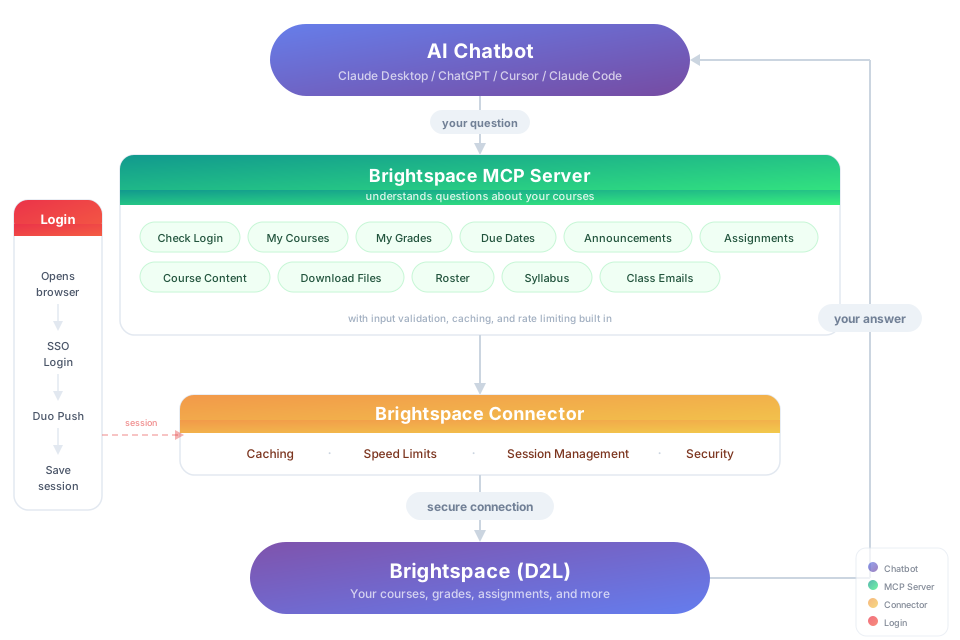
Get started in 3 steps
Install Node.js (version 20 or newer) if you don't have it. Download, run the installer, done.
Open a terminal and run the setup:
npx -y brightspace-mcp-server@latest setupIt asks for your school's Brightspace address, your username and password, and how you confirm it's you when you sign in (a phone app, or another way like a text message). Your password goes into your computer's own password store (Keychain on Mac, Credential Manager on Windows), never into a file. Before signing you in, it connects itself to Claude Desktop, Cursor, Antigravity, Codex, or Claude Code if you have them. If one of them already has a
brightspaceentry pointing somewhere else (an old local build, a fork), setup shows you that entry and asks before replacing it.On a Mac: when Keychain asks whether
nodemay use the saved Brightspace password, choose Always Allow, not just Allow. That lets later sign-ins (theauthcommand and questions from your AI app) read it without asking again.Restart your AI app and ask it something — the first question signs you in. If your phone asks you to approve a sign-in, approve it and ask again.


