



overpod/mcp-telegram

overpod/mcp-telegram

от overpod
MCP-сервер для подключения Claude и ChatGPT к Telegram через MTProto. Работает как юзербот под вашим аккаунтом: полный доступ к чатам, сообщениям, медиа, стикерам, сторис и управлению профилем. Всё...

Telegram MCP Server

npm npm downloads Node.js TypeScript MCP SDK License: MIT mcp-telegram MCP server

📖 Documentation · ☁️ Cloud version — connect Telegram to Claude.ai or ChatGPT in 30 seconds with QR code, no API keys needed.
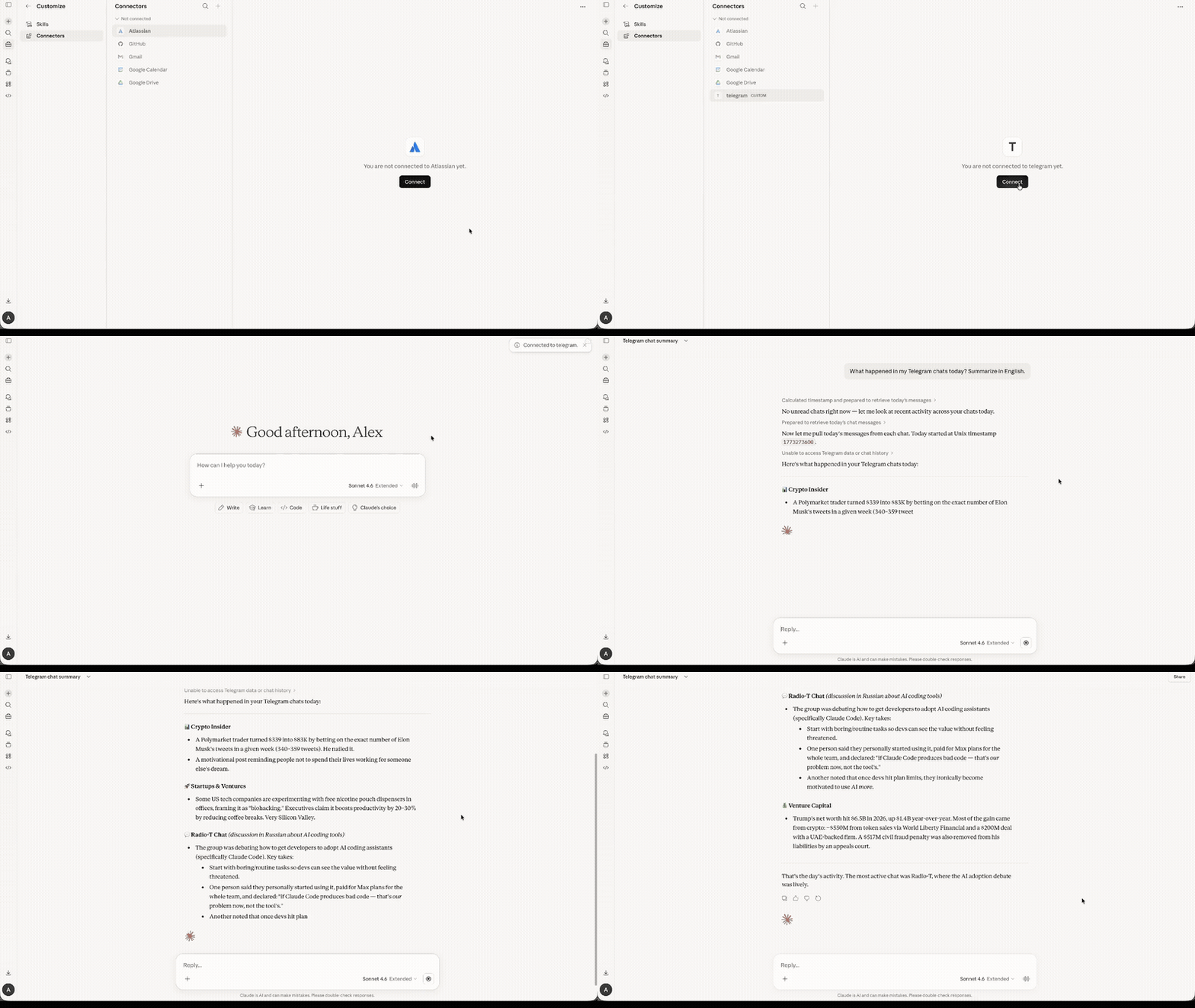
MCP Telegram demo — connect and summarize chats in Claude

Telegram MCP Server — a Model Context Protocol server that connects AI assistants like Claude and ChatGPT to Telegram via the MTProto protocol. Unlike bots, this runs as a userbot -- it operates under your personal Telegram account using GramJS, giving full access to your chats, contacts, and message history.

Features

  • Comprehensive tool coverage -- the most full-featured Telegram MCP server available
  • MTProto protocol -- direct Telegram API access, not the limited Bot API
  • Userbot -- operates as your personal account, not a bot
  • Full-featured -- messaging, reactions, polls, scheduled messages, stickers, media, contacts, and more
  • Forum Topics -- list topics, read per-topic messages, send to specific topics, per-topic unread counts
  • Stickers -- search sticker sets, browse installed/recent stickers, send stickers to any chat
  • Account & profile management -- update profile, set emoji status, birthday, personal channel, profile photo, manage privacy settings, sessions, auto-delete timers
  • Chat folders -- create, edit, delete and reorder folders, toggle folder tags, read suggested folders (v1.33.0)
  • Global privacy -- read and set account-wide privacy settings (v1.33.0)
  • Global search -- search messages across all chats at once
  • Real-time polling -- fetch updates via stateless cursors; agent owns {pts, qts, date} state
  • Inline bots & buttons -- query inline bots, send results, press callback buttons
  • Stories -- read stories from peers, get story view stats; publish/edit/delete stories, react, pin, stealth mode, archive, report (v1.30.0)
  • Discussion -- get discussion-group info for channel posts with comments, list groups eligible for discussion (v1.30.0)
  • Read Receipts -- who read a message in a small group, when your private message was read (v1.30.0)
  • Admin controls -- toggle channel signatures, anti-spam, forum mode, prehistory; approve join requests
  • Stats -- channel and supergroup analytics (GetBroadcastStats / GetMegagroupStats)
  • Boosts & Business -- boost status, boosters list, Telegram Business chat links CRUD, work hours, location, greeting/away/intro messages
  • Star gifts -- browse available and saved gifts, save/convert gifts, manage Stars balance and subscriptions (opt-in via MCP_TELEGRAM_ENABLE_STARS=1, v1.34.0)
  • Shared daemon -- one background process serves multiple MCP clients over a single Telegram session; see the shared-daemon guide (v1.38.0)
  • QR code login -- authenticate by scanning a QR code in the Telegram app
  • Session persistence -- login once, stay connected across restarts
  • Human-readable output -- sender names are resolved, not just numeric IDs
  • Works with any MCP client -- Claude Code, Claude Desktop, ChatGPT, Cursor, VS Code, Mastra, etc.

Часто задаваемые вопросы

У этого сервера пока нет списка инструментов.
1.43.6основная
1.43.5
1.43.4
1.43.3
1.43.2
1.43.1
1.43.0
1.42.0
1.41.7
1.41.6
1.41.5
1.41.4
1.41.3
1.41.2
1.41.1
1.41.0
1.40.0
1.39.1
1.39.0
1.38.2
1.38.1
1.38.0
1.37.1
1.37.0
1.36.5
1.36.4
1.36.3
1.36.2
1.36.1
1.36.0
1.35.0
1.34.0
1.33.0
1.32.0
1.28.1
1.28.0
1.27.1
1.27.0
1.26.1
1.26.0
1.25.0
1.24.1
1.24.0
1.23.0
1.22.0
1.21.0
1.20.0
1.19.0
1.18.0
1.17.0
1.16.0
1.15.0
1.14.0
1.13.0
1.12.0
1.11.1
1.11.0
1.10.1
1.10.0
1.9.0
1.8.1
1.8.0
1.7.0
1.2.0
1.6.0
1.5.0
1.4.0
1.3.1
1.1.1
1.1.0

Выберите клиент, чтобы установить overpod/mcp-telegram:

Любой клиент

Конфиг добавления MCP сервера стандартный, обычно он не меняется вообще, поэтому подходит практически к любому ИИ клиенту, поддерживающему MCP.

{
  "mcpServers": {
    "overpod-mcp-telegram-sz6eg1c0sv": {
      "command": "npx",
      "args": [
        "@overpod/mcp-telegram"
      ],
      "env": {
        "TELEGRAM_API_ID": "YOUR_ID",
        "TELEGRAM_API_HASH": "YOUR_HASH"
      }
    }
  }
}
CursorCursor

Перейдите по ссылке и сервер автоматически будет добавлен в Cursor. Либо откройте/создайте файл ~/.cursor/mcp.json(%USERPROFILE%\.cursor\mcp.json на Windows) и добавьте конфиг сервера:

{
  "mcpServers": {
    "overpod-mcp-telegram-sz6eg1c0sv": {
      "command": "npx",
      "args": [
        "@overpod/mcp-telegram"
      ],
      "env": {
        "TELEGRAM_API_ID": "YOUR_ID",
        "TELEGRAM_API_HASH": "YOUR_HASH"
      }
    }
  }
}
VS Code

Создайте .vscode/mcp.json в проекте (ключ верхнего уровня — servers):

{
  "servers": {
    "overpod-mcp-telegram-sz6eg1c0sv": {
      "type": "stdio",
      "command": "npx",
      "args": [
        "@overpod/mcp-telegram"
      ],
      "env": {
        "TELEGRAM_API_ID": "YOUR_ID",
        "TELEGRAM_API_HASH": "YOUR_HASH"
      }
    }
  }
}

Либо добавьте сервер через терминал:

code --add-mcp "{\"name\":\"overpod-mcp-telegram-sz6eg1c0sv\",\"type\":\"stdio\",\"command\":\"npx\",\"args\":[\"@overpod/mcp-telegram\"],\"env\":{\"TELEGRAM_API_ID\":\"YOUR_ID\",\"TELEGRAM_API_HASH\":\"YOUR_HASH\"}}"
ClaudeClaude Desktop

Откройте Settings → Developer → Edit Config — это откроет файл claude_desktop_config.json:

  • macOS: ~/Library/Application Support/Claude/claude_desktop_config.json
  • Windows: %APPDATA%\Claude\claude_desktop_config.json

Впишите сервер и полностью перезапустите Claude Desktop:

{
  "mcpServers": {
    "overpod-mcp-telegram-sz6eg1c0sv": {
      "command": "npx",
      "args": [
        "@overpod/mcp-telegram"
      ],
      "env": {
        "TELEGRAM_API_ID": "YOUR_ID",
        "TELEGRAM_API_HASH": "YOUR_HASH"
      }
    }
  }
}
Claude CodeClaude Code

Добавьте сервер одной командой в терминале:

claude mcp add overpod-mcp-telegram-sz6eg1c0sv --env TELEGRAM_API_ID=YOUR_ID --env TELEGRAM_API_HASH=YOUR_HASH -- npx @overpod/mcp-telegram

Либо через JSON-конфиг:

claude mcp add-json overpod-mcp-telegram-sz6eg1c0sv "{\"command\":\"npx\",\"args\":[\"@overpod/mcp-telegram\"],\"env\":{\"TELEGRAM_API_ID\":\"YOUR_ID\",\"TELEGRAM_API_HASH\":\"YOUR_HASH\"}}"
CodexCodex

Добавьте сервер командой в терминале:

codex mcp add overpod-mcp-telegram-sz6eg1c0sv --env TELEGRAM_API_ID=YOUR_ID --env TELEGRAM_API_HASH=YOUR_HASH -- npx @overpod/mcp-telegram

Либо вручную в ~/.codex/config.toml(%USERPROFILE%\.codex\config.toml на Windows):

[mcp_servers.overpod-mcp-telegram-sz6eg1c0sv]
command = "npx"
args = ["@overpod/mcp-telegram"]

[mcp_servers.overpod-mcp-telegram-sz6eg1c0sv.env]
TELEGRAM_API_ID = "YOUR_ID"
TELEGRAM_API_HASH = "YOUR_HASH"
PerplexityPerplexity

MCP доступен подписчикам Perplexity Pro / Max / Enterprise. Локальные серверы — только в приложении для macOS.

  1. Откройте Настройки аккаунта → Connectors.
  2. Установите вспомогательное приложение PerplexityXPC (один раз).
  3. Нажмите Add Connector → вкладка Simple.
  4. В поле Server Name укажите overpod/mcp-telegram, а в поле команды запуска — строку ниже:
npx @overpod/mcp-telegram

Нажмите Save и дождитесь статуса Running.

WindsurfWindsurf

Откройте Windsurf Settings → Cascade → MCP Servers или отредактируйте файл ~/.codeium/windsurf/mcp_config.json:

{
  "mcpServers": {
    "overpod-mcp-telegram-sz6eg1c0sv": {
      "command": "npx",
      "args": [
        "@overpod/mcp-telegram"
      ],
      "env": {
        "TELEGRAM_API_ID": "YOUR_ID",
        "TELEGRAM_API_HASH": "YOUR_HASH"
      }
    }
  }
}
ClineCline

В панели Cline нажмите иконку MCP Servers → Configure → Configure MCP Servers (или отредактируйте ~/.cline/mcp.json) и добавьте сервер:

{
  "mcpServers": {
    "overpod-mcp-telegram-sz6eg1c0sv": {
      "command": "npx",
      "args": [
        "@overpod/mcp-telegram"
      ],
      "env": {
        "TELEGRAM_API_ID": "YOUR_ID",
        "TELEGRAM_API_HASH": "YOUR_HASH"
      },
      "disabled": false,
      "autoApprove": []
    }
  }
}
Continue

Создайте файл в .continue/mcpServers/ (например overpod-mcp-telegram-sz6eg1c0sv.yaml) или добавьте блок в config.yaml. MCP работает только в режиме agent:

mcpServers:
  - name: overpod-mcp-telegram-sz6eg1c0sv
    command: npx
    args:
      - "@overpod/mcp-telegram"
    env:
      TELEGRAM_API_ID: YOUR_ID
      TELEGRAM_API_HASH: YOUR_HASH
Zed

Выполните agent: add context server или откройте настройки (zed: open settings file) и добавьте сервер в объект context_servers:

{
  "context_servers": {
    "overpod-mcp-telegram-sz6eg1c0sv": {
      "command": "npx",
      "args": [
        "@overpod/mcp-telegram"
      ],
      "env": {
        "TELEGRAM_API_ID": "YOUR_ID",
        "TELEGRAM_API_HASH": "YOUR_HASH"
      }
    }
  }
}

Похожие MCP-сервера

chigwell/telegram-mcp

chigwell/telegram-mcp

от chigwell

Отправляет сообщения, управляет чатами, контактами и медиа в Telegram: 80+ операций для автоматизации переписки и администрирования.

Python⭐ 1862
chaindead/telegram-mcp

chaindead/telegram-mcp

от chaindead

Telegram MCP сервер подключает AI-ассистентов к вашему аккаунту: чтение диалогов, отправка сообщений, отслеживание уведомлений. Работает с Claude, Cursor. Упрощает управление перепиской и автоматизацию ответов.

Go⭐ 349
trycourier/courier-mcp

trycourier/courier-mcp

от trycourier

MCP-сервер Courier даёт AI-агентам полный доступ к API уведомлений через 124 инструмента: отправка сообщений, управление профилями, доставкой, списками и аудиенциями. Полезен для интеграции ИИ-аген...

TypeScript⭐ 2
GeiserX/telegram-archive-mcp

GeiserX/telegram-archive-mcp

от geiserx

Telegram-Archive-MCP — мост, который превращает любой экземпляр Telegram-Archive в MCP-сервер. LLM и агенты могут искать сообщения, просматривать чаты и статистику архива через единый JSON-RPC эндп...

Go⭐ 7
saseq/discord-mcp

saseq/discord-mcp

от saseq

MCP-сервер для Discord API, интегрирующий ботов с ИИ-ассистентами. Даёт AI полный контроль над сервером: управление каналами, сообщениями и модерацией. Идеален для автоматизации Discord-сообществ.

Java⭐ 553
googlarz/signal-mcp

googlarz/signal-mcp

от googlarz

Добавляет к signal-cli постоянную историю сообщений, полнотекстовый поиск и MCP-сервер. Claude может читать, искать и отправлять Signal-сообщения. Всё локально, без облачных сервисов. Подходит для ...

Python⭐ 9
© Каталог MCP, 2026. Все права защищены.
Проект не аффилирован с Anthropic и любыми упомянутыми продуктами.
Все названия и торговые марки принадлежат их владельцам.
Контакты для связи: hi@mcp-katalog.ru

Лука Никитин