

Neverlow512/agent-droid-bridge

Neverlow512/agent-droid-bridge

от neverlow512
MCP-сервер для подключения AI-агентов к Android-устройствам через ADB. Используется в мобильной автоматизации, тестировании и реверс-инжиниринге: скриншоты, касания, ввод текста, управление приложе...

Python 3.11+ License MIT MCP Compatible PyPI MCP Registry Awesome PyPI Downloads LinkedIn Ask DeepWiki

Agent Droid Bridge

Agent Droid Bridge is an MCP server that connects AI agents to Android devices and emulators over ADB. It is built for mobile automation, app testing, dynamic analysis, and reverse engineering: exposing the full surface of ADB as structured tools that any MCP-compatible AI client can call directly. If ADB can do it, an agent can do it.


Purpose-built tools return structured, minimal responses. No raw XML dumps, no wasted context — agents stay fast across long sessions.

agent-droid-bridge MCP server

Demo

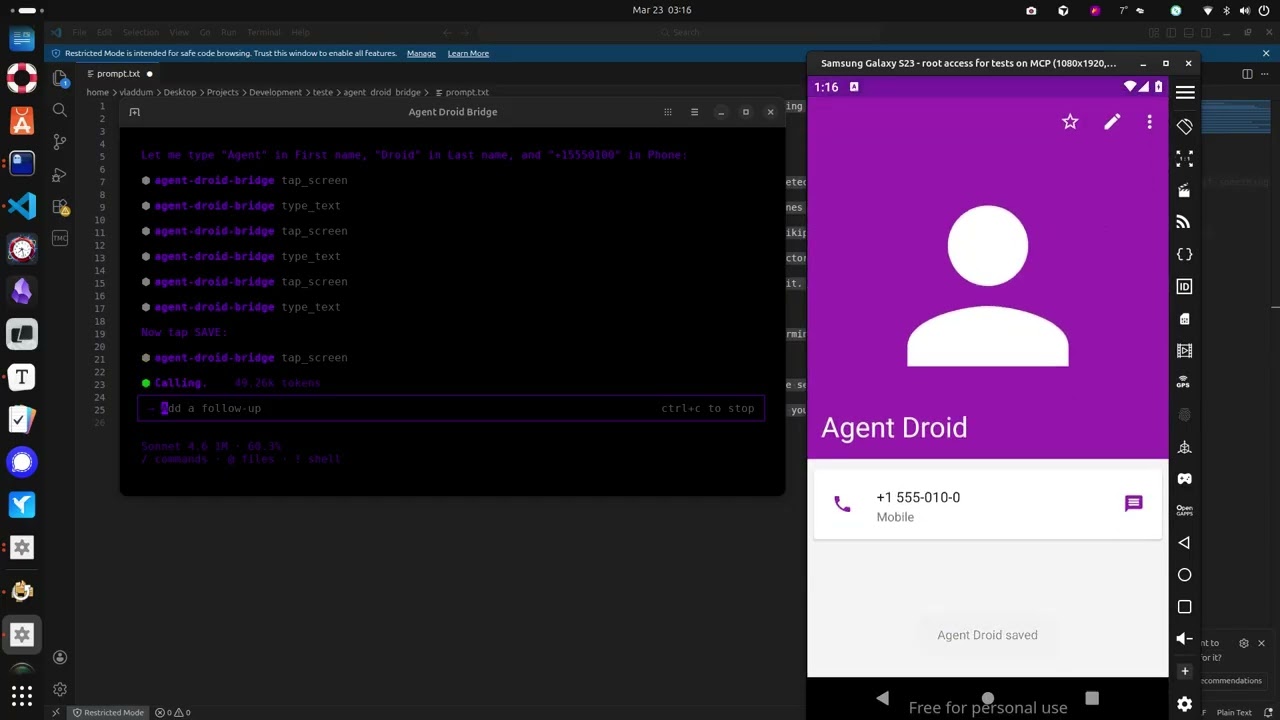
Agent Droid Bridge Demo

The demo above runs through a few straightforward tasks to show what a connected agent can do, and this is just scratching the surface:

  • Installs the Paint app, opens it, and draws a house by calculating pixel coordinates for the walls and roof
  • Opens the device browser, searches for "MCP Wikipedia", navigates to the result page, and takes a screenshot
  • Opens the Calculator, computes 1337 × 42, and extracts the result to the host machine
  • Opens Contacts, creates a new entry with a name and phone number, and confirms it saved
  • Opens the Calendar and schedules an appointment for a specific date
  • Opens Settings and toggles dark mode
  • Extracts the Calculator APK from the device to the host machine
  • Installs Notepad, writes a one-sentence summary of every task completed, and takes a final screenshot
check_device_capabilities

Возможности устройства и аппаратный профиль для подключенного Android-устройства. Используйте 'identity', чтобы определить, с каким устройством вы работаете, перед началом сессии. Используйте 'security', когда задача требует root-прав или нужно подтвердить уровень привилегий. Используйте 'hardware', когда нужны размеры экрана или ограничения памяти для решений по компоновке. Используйте 'all' только тогда, когда нужен полный профиль и задержка не имеет значения.

Возможности устройства и аппаратный профиль для подключенного Android-устройства. Используйте 'identity', чтобы определить, с каким устройством вы работаете, перед началом сессии. Используйте 'security', когда задача требует root-прав или нужно подтвердить уровень привилегий. Используйте 'hardware', когда нужны размеры экрана или ограничения памяти для решений по компоновке. Используйте 'all' только тогда, когда нужен полный профиль и задержка не имеет значения.

Параметры

  • modeenumобязательный

    'identity': manufacturer, model, Android version, API level, device type, emulator status, CPU ABI, hardware identifiers, build fingerprint, build tags, kernel version, and SELinux status. 'security': ADB root status, su availability, debuggable and secure flags, verified boot state, USB config, dm-verity, encryption state, and SELinux status. 'hardware': CPU ABI, CPU ABI2, screen resolution, screen density, total RAM, CPU cores, total storage, GPU, hardware board, and supported ABIs. 'all': all fields from all modes in a single call.

    identitysecurityhardwareall
  • device_serialany

    Target device serial — pass as device_serial=<serial>. Android device serial (e.g. 'emulator-5554' or '192.168.1.10:5555'). Omit only when a single device is connected. If the tool returns a multi-device error: STOP. Present the device list to the user verbatim and wait for their explicit choice. Do NOT retry with a guessed or inferred serial — this is a hard requirement. Once the user provides a serial, use it for every subsequent call in this session. To switch devices mid-session, ask the user first.

detect_ui_change

Опрашивает иерархию UI после действия и возвращает результат, когда содержимое экрана изменится или истечёт таймаут. Возвращает статус изменения и затраченное время. По умолчанию не выводит XML-иерархию для эффективности — установите return_hierarchy=True, чтобы получить полную иерархию. Для эффективного обнаружения изменений: вызовите snapshot_ui перед действием, выполните действие, затем вызовите detect_ui_change с baseline_token. Используйте без baseline_token только когда нужно дождаться медленного перехода (загрузочные экраны, анимации). Не используйте для чтения текущего состояния экрана — для этого применяйте get_ui_hierarchy.

Опрашивает иерархию UI после действия и возвращает результат, когда содержимое экрана изменится или истечёт таймаут. Возвращает статус изменения и затраченное время. По умолчанию не выводит XML-иерархию для эффективности — установите return_hierarchy=True, чтобы получить полную иерархию. Для эффективного обнаружения изменений: вызовите snapshot_ui перед действием, выполните действие, затем вызовите detect_ui_change с baseline_token. Используйте без baseline_token только когда нужно дождаться медленного перехода (загрузочные экраны, анимации). Не используйте для чтения текущего состояния экрана — для этого применяйте get_ui_hierarchy.

Параметры

  • timeout_secondsinteger

    Maximum seconds to poll for a UI change.

  • baseline_tokenany

    Token returned by snapshot_ui, captured before the action. When provided, compares current UI against that snapshot — use this for reliable change detection without loading XML into context. When omitted, captures a fresh baseline at call time.

  • return_hierarchyboolean

    When False (default), returns only changed and elapsed_seconds — no XML. Set to True to include the full UI hierarchy in the response. Only set True when you need to read element data immediately after the change.

  • device_serialany

    Target device serial — pass as device_serial=<serial>. Android device serial (e.g. 'emulator-5554' or '192.168.1.10:5555'). Omit only when a single device is connected. If the tool returns a multi-device error: STOP. Present the device list to the user verbatim and wait for their explicit choice. Do NOT retry with a guessed or inferred serial — this is a hard requirement. Once the user provides a serial, use it for every subsequent call in this session. To switch devices mid-session, ask the user first.

execute_adb_command

Вывод команды ADB. Безопасно разобрано через shlex и никогда не передаётся в системную оболочку.

Вывод команды ADB. Безопасно разобрано через shlex и никогда не передаётся в системную оболочку.

Параметры

  • commandstringобязательный

    ADB command to execute. Parsed safely — no shell injection possible.

  • use_shellboolean

    When True, runs as an Android shell command (adb shell ...). When False, runs as a top-level ADB command (adb devices, adb install, etc.).

  • device_serialany

    Target device serial — pass as device_serial=<serial>. Android device serial (e.g. 'emulator-5554' or '192.168.1.10:5555'). Omit only when a single device is connected. If the tool returns a multi-device error: STOP. Present the device list to the user verbatim and wait for their explicit choice. Do NOT retry with a guessed or inferred serial — this is a hard requirement. Once the user provides a serial, use it for every subsequent call in this session. To switch devices mid-session, ask the user first.

get_screen_elements

Структурированный список UI-элементов, видимых в данный момент на экране Android. Возвращает элементы, отфильтрованные и сформированные в соответствии с выбранным режимом. Для навигации используйте 'tappable', а 'interactive' — когда нужны XPath или границы для ADB-команд. Используйте 'all' только в крайнем случае - он возвращает все узлы и может быть большим.

Структурированный список UI-элементов, видимых в данный момент на экране Android. Возвращает элементы, отфильтрованные и сформированные в соответствии с выбранным режимом. Для навигации используйте 'tappable', а 'interactive' — когда нужны XPath или границы для ADB-команд. Используйте 'all' только в крайнем случае - он возвращает все узлы и может быть большим.

Параметры

  • modestring

    Controls which elements are returned and how much detail each carries. 'tappable' (default): only clickable, focusable, or scrollable elements with minimal fields (resource ID, text, content description, centre coordinates) — best for quick navigation when you need tap targets, lowest token cost. 'interactive': same element filter as tappable but returns full detail including XPath, bounds, class name, and all boolean state flags — use when you need to construct precise ADB commands or distinguish elements by type. 'input': only editable text fields (EditText and similar) with full detail — use when you need to find fields to type into. On Compose-based apps, input fields may not be detected; use 'interactive' mode instead and look for focusable elements. 'all': every element in the UI tree with full detail — use only for security analysis or when other modes miss what you need, as output can be large.

  • device_serialany

    Target device serial — pass as device_serial=<serial>. Android device serial (e.g. 'emulator-5554' or '192.168.1.10:5555'). Omit only when a single device is connected. If the tool returns a multi-device error: STOP. Present the device list to the user verbatim and wait for their explicit choice. Do NOT retry with a guessed or inferred serial — this is a hard requirement. Once the user provides a serial, use it for every subsequent call in this session. To switch devices mid-session, ask the user first.

get_screen_text

Возвращает весь видимый текст на текущем экране Android, отсортированный сверху вниз. Используйте это, когда нужно прочитать, что отображается на экране. Не включает координаты или информацию об элементах - для нажатий или взаимодействия используйте `get_screen_elements`.

Возвращает весь видимый текст на текущем экране Android, отсортированный сверху вниз. Используйте это, когда нужно прочитать, что отображается на экране. Не включает координаты или информацию об элементах - для нажатий или взаимодействия используйте `get_screen_elements`.

Параметры

  • device_serialany

    Target device serial — pass as device_serial=<serial>. Android device serial (e.g. 'emulator-5554' or '192.168.1.10:5555'). Omit only when a single device is connected. If the tool returns a multi-device error: STOP. Present the device list to the user verbatim and wait for their explicit choice. Do NOT retry with a guessed or inferred serial — this is a hard requirement. Once the user provides a serial, use it for every subsequent call in this session. To switch devices mid-session, ask the user first.

get_ui_hierarchy

Возвращает текущий экран Android в виде XML-иерархии UI. Используйте этот инструмент, когда нужно определить координаты элементов, прочитать текст или найти ID ресурсов для взаимодействия. Не вызывайте его после каждого действия, вызывайте только когда действительно нужно прочитать содержимое экрана. Чтобы проверить, изменился ли экран после действия, используйте snapshot_ui до действия и detect_ui_change после.

Возвращает текущий экран Android в виде XML-иерархии UI. Используйте этот инструмент, когда нужно определить координаты элементов, прочитать текст или найти ID ресурсов для взаимодействия. Не вызывайте его после каждого действия, вызывайте только когда действительно нужно прочитать содержимое экрана. Чтобы проверить, изменился ли экран после действия, используйте snapshot_ui до действия и detect_ui_change после.

Параметры

  • device_serialany

    Target device serial — pass as device_serial=<serial>. Android device serial (e.g. 'emulator-5554' or '192.168.1.10:5555'). Omit only when a single device is connected. If the tool returns a multi-device error: STOP. Present the device list to the user verbatim and wait for their explicit choice. Do NOT retry with a guessed or inferred serial — this is a hard requirement. Once the user provides a serial, use it for every subsequent call in this session. To switch devices mid-session, ask the user first.

launch_app

Android-приложение, запущенное по имени компонента (package/activity).

Android-приложение, запущенное по имени компонента (package/activity).

Параметры

  • componentstringобязательный

    Android component in 'package/activity' format, e.g. 'com.android.settings/.Settings'.

  • device_serialany

    Target device serial — pass as device_serial=<serial>. Android device serial (e.g. 'emulator-5554' or '192.168.1.10:5555'). Omit only when a single device is connected. If the tool returns a multi-device error: STOP. Present the device list to the user verbatim and wait for their explicit choice. Do NOT retry with a guessed or inferred serial — this is a hard requirement. Once the user provides a serial, use it for every subsequent call in this session. To switch devices mid-session, ask the user first.

list_devices

Все Android-устройства, видимые в данный момент для ADB, с их серийными номерами, состоянием подключения и названиями моделей.

Все Android-устройства, видимые в данный момент для ADB, с их серийными номерами, состоянием подключения и названиями моделей.

Параметры

Без параметров.

press_key

Клавишное событие, отправляемое на устройство Android с помощью указанного целочисленного кода клавиши.

Клавишное событие, отправляемое на устройство Android с помощью указанного целочисленного кода клавиши.

Параметры

  • keycodeintegerобязательный

    Android keycode integer. Common: BACK=4, HOME=3, ENTER=66, RECENTS=187, TAB=61, DEL=67.

  • device_serialany

    Target device serial — pass as device_serial=<serial>. Android device serial (e.g. 'emulator-5554' or '192.168.1.10:5555'). Omit only when a single device is connected. If the tool returns a multi-device error: STOP. Present the device list to the user verbatim and wait for their explicit choice. Do NOT retry with a guessed or inferred serial — this is a hard requirement. Once the user provides a serial, use it for every subsequent call in this session. To switch devices mid-session, ask the user first.

snapshot_ui

Делает лёгкий снимок текущего состояния интерфейса и возвращает короткий токен. Используйте это перед выполнением действия (нажатие, свайп, запуск, нажатие клавиши), когда вам нужно только подтвердить, что экран изменился после, а не читать его содержимое. Передайте возвращённый токен в detect_ui_change как baseline_token. Это позволяет не загружать полную иерархию XML в контекст без необходимости. Не используйте это, когда вам нужно читать или взаимодействовать с элементами экрана — используйте для этого get_ui_hierarchy.

Делает лёгкий снимок текущего состояния интерфейса и возвращает короткий токен. Используйте это перед выполнением действия (нажатие, свайп, запуск, нажатие клавиши), когда вам нужно только подтвердить, что экран изменился после, а не читать его содержимое. Передайте возвращённый токен в detect_ui_change как baseline_token. Это позволяет не загружать полную иерархию XML в контекст без необходимости. Не используйте это, когда вам нужно читать или взаимодействовать с элементами экрана — используйте для этого get_ui_hierarchy.

Параметры

  • device_serialany

    Target device serial — pass as device_serial=<serial>. Android device serial (e.g. 'emulator-5554' or '192.168.1.10:5555'). Omit only when a single device is connected. If the tool returns a multi-device error: STOP. Present the device list to the user verbatim and wait for their explicit choice. Do NOT retry with a guessed or inferred serial — this is a hard requirement. Once the user provides a serial, use it for every subsequent call in this session. To switch devices mid-session, ask the user first.

swipe_screen

Жест смахивания на экране Android из (x1,y1) в (x2,y2) в течение заданной длительности.

Жест смахивания на экране Android из (x1,y1) в (x2,y2) в течение заданной длительности.

Параметры

  • x1integerобязательный

    Start X coordinate

  • y1integerобязательный

    Start Y coordinate

  • x2integerобязательный

    End X coordinate

  • y2integerобязательный

    End Y coordinate

  • duration_msinteger

    Swipe duration in milliseconds

  • device_serialany

    Target device serial — pass as device_serial=<serial>. Android device serial (e.g. 'emulator-5554' or '192.168.1.10:5555'). Omit only when a single device is connected. If the tool returns a multi-device error: STOP. Present the device list to the user verbatim and wait for their explicit choice. Do NOT retry with a guessed or inferred serial — this is a hard requirement. Once the user provides a serial, use it for every subsequent call in this session. To switch devices mid-session, ask the user first.

take_screenshot

PNG-скриншот текущего экрана устройства Android с шириной, высотой и данными изображения, закодированными в base64.

PNG-скриншот текущего экрана устройства Android с шириной, высотой и данными изображения, закодированными в base64.

Параметры

  • device_serialany

    Target device serial — pass as device_serial=<serial>. Android device serial (e.g. 'emulator-5554' or '192.168.1.10:5555'). Omit only when a single device is connected. If the tool returns a multi-device error: STOP. Present the device list to the user verbatim and wait for their explicit choice. Do NOT retry with a guessed or inferred serial — this is a hard requirement. Once the user provides a serial, use it for every subsequent call in this session. To switch devices mid-session, ask the user first.

tap_screen

Касание в указанных пиксельных координатах на экране Android.

Касание в указанных пиксельных координатах на экране Android.

Параметры

  • xintegerобязательный

    X coordinate in screen pixels

  • yintegerобязательный

    Y coordinate in screen pixels

  • device_serialany

    Target device serial — pass as device_serial=<serial>. Android device serial (e.g. 'emulator-5554' or '192.168.1.10:5555'). Omit only when a single device is connected. If the tool returns a multi-device error: STOP. Present the device list to the user verbatim and wait for their explicit choice. Do NOT retry with a guessed or inferred serial — this is a hard requirement. Once the user provides a serial, use it for every subsequent call in this session. To switch devices mid-session, ask the user first.

type_text

Ввод текста в активное поле ввода Android. Пробелы кодируются автоматически.

Ввод текста в активное поле ввода Android. Пробелы кодируются автоматически.

Параметры

  • textstringобязательный

    Text to type into the focused input field.

  • device_serialany

    Target device serial — pass as device_serial=<serial>. Android device serial (e.g. 'emulator-5554' or '192.168.1.10:5555'). Omit only when a single device is connected. If the tool returns a multi-device error: STOP. Present the device list to the user verbatim and wait for their explicit choice. Do NOT retry with a guessed or inferred serial — this is a hard requirement. Once the user provides a serial, use it for every subsequent call in this session. To switch devices mid-session, ask the user first.

Другие проверенные MCP-сервера

zillow/auto-mobile

zillow/auto-mobile

официальный

AutoMobile - MCP сервер для автоматизации мобильных приложений, полезный для UI тестирования и как ассистент разработчика под Android (iOS в планах). Позволяет взаимодействовать с эмуляторами, управлять жизненным циклом приложений и автоматически писать тесты через source mapping.

TypeScript79
qdrant/mcp-server-qdrant

qdrant/mcp-server-qdrant

официальный

MCP инструмент для Qdrant реализует семантическую память с векторным поиском: сохраняет информацию (store) и ищет по смыслу (find). Полезен AI-агентам для долговременного контекста. Поддерживает stdio и SSE.

Python1472
OctoMind-dev/octomind-mcp

OctoMind-dev/octomind-mcp

официальный

MCP сервер для платформы Octomind: управляйте e2e тестами прямо из локальной среды. Создавайте тест-кейсы по описанию, запускайте тесты и управляйте окружениями. Получайте отчёты. Полезен разработчикам и QA для интеграции автоматизированного тестирования.

TypeScript24
ref-tools/ref-tools-mcp

ref-tools/ref-tools-mcp

MCP сервер для AI-агентов: быстрый доступ к документации API и библиотек. Оснащён поиском с фильтрацией результатов и чтением только релевантных разделов страниц - экономит токены. Подходит для Claude Code и других AI-кодинговых ассистентов.

TypeScript1140
evilsocket/nerve

evilsocket/nerve

Nerve — Agent Development Kit с нативной поддержкой MCP. Определяйте MCP серверы в YAML, запускайте как клиент или сервер, оркестрируйте агентов и тестируйте их в воспроизводимых сценариях. Для разработчиков, которым нужны программируемые и аудируемые LLM-агенты.

Python1318
Rootly-AI-Labs/Rootly-MCP-server

Rootly-AI-Labs/Rootly-MCP-server

официальный

MCP сервер для управления инцидентами, дежурствами и оповещениями через Rootly API. Полезен SRE, инженерам и руководителям для автоматического реагирования, анализа и сокращения времени восстановления. Поддерживает Cursor, Claude, Windsurf и другие MCP клиенты.

Python44
© Каталог MCP, 2026. Все права защищены.
Проект не аффилирован с Anthropic и любыми упомянутыми продуктами.
Все названия и торговые марки принадлежат их владельцам.
Контакты для связи: hi@mcp-katalog.ru

Лука Никитин