JamsusMaximus/trainingpeaks-mcp

JamsusMaximus/trainingpeaks-mcp

от jamsusmaximus
MCP сервер для управления тренировками в TrainingPeaks через AI-ассистентов. Создавайте интервальные структуры, управляйте календарем и отслеживайте фитнес-тренды без API-ключей. Аутентификация через cookie из браузера. Полезен спортсменам и тренерам.

TrainingPeaks MCP Server

TrainingPeaks MCP server

Connect TrainingPeaks to Claude and other AI assistants via the Model Context Protocol (MCP). Query workouts, build structured intervals, manage your calendar, track fitness trends, and control your training through natural conversation.

No API approval required. The official Training Peaks API is approval-gated, but this server uses secure cookie authentication that any user can set up in minutes. Your cookie is stored in your system keyring, never transmitted anywhere except to TrainingPeaks.

What You Can Do
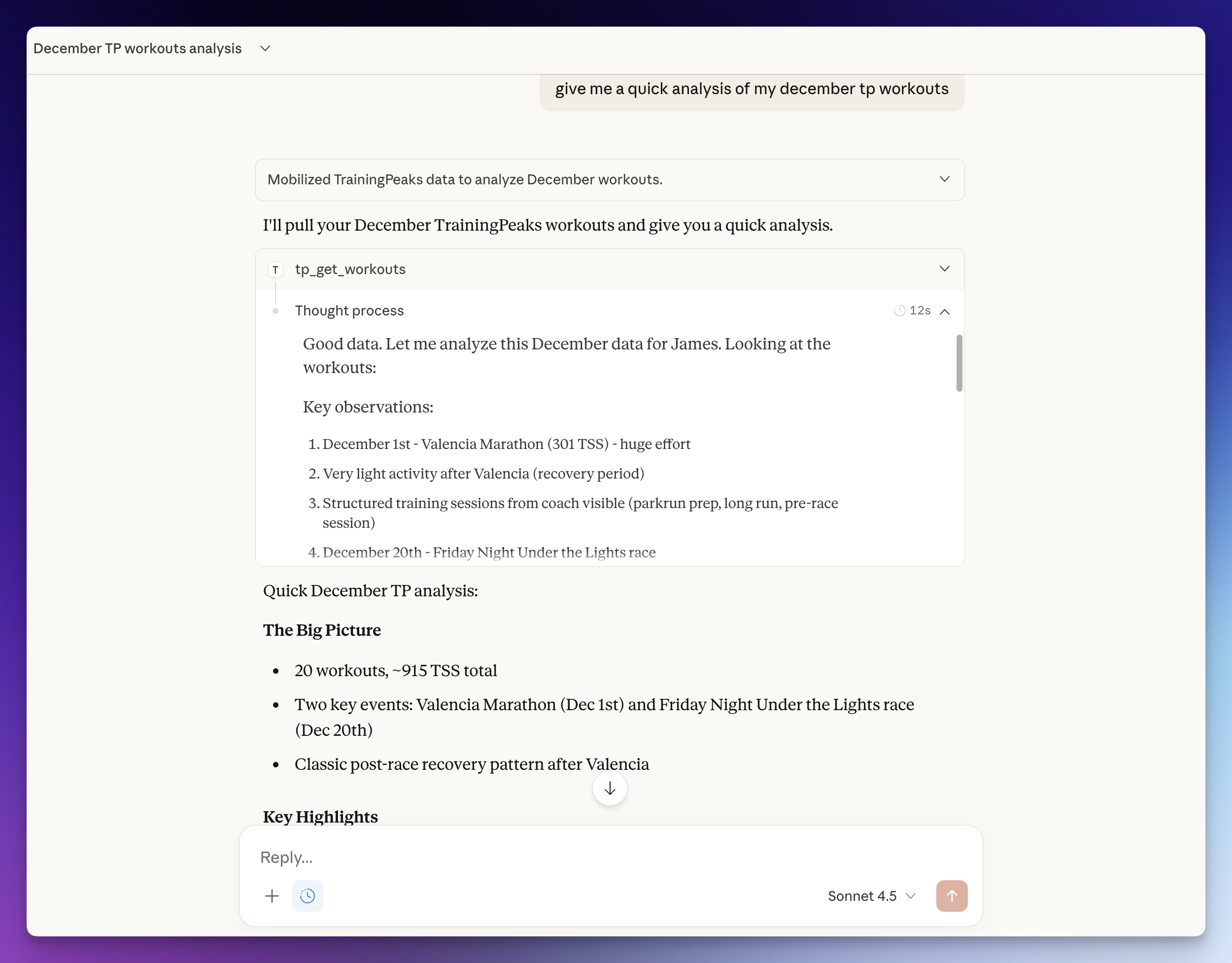
Example conversation with Claude using TrainingPeaks MCP

Ask your AI assistant things like:

  • "Build me a 4x8min threshold session for Tuesday with warm-up and cool-down"
  • "Schedule my mobility session for April 14, 2026 at 16:45"
  • "Compare my FTP progression this year vs last year"
  • "Copy last week's long ride to this Saturday"
  • "Log my weight at 74.5kg and sleep at 7.5 hours"
  • "What's my weekly TSS so far? Am I on track for my ATP target?"
  • "Show my race calendar and how many weeks until my A race"
  • "Set my FTP to 310 and update my power zones"
  • "Add a calendar note for next Monday: rest day, travel"

Часто задаваемые вопросы

У этого сервера пока нет списка инструментов.

Выберите клиент, чтобы установить JamsusMaximus/trainingpeaks-mcp:

Любой клиент

Конфиг добавления MCP сервера стандартный, обычно он не меняется вообще, поэтому подходит практически к любому ИИ клиенту, поддерживающему MCP.

{
  "mcpServers": {
    "jamsusmaximus-trainingpeaks-mcp-fayhfbur9h": {
      "command": "npx",
      "args": [
        "some-other-mcp"
      ]
    }
  }
}
CursorCursor

Перейдите по ссылке и сервер автоматически будет добавлен в Cursor. Либо откройте/создайте файл ~/.cursor/mcp.json(%USERPROFILE%\.cursor\mcp.json на Windows) и добавьте конфиг сервера:

{
  "mcpServers": {
    "jamsusmaximus-trainingpeaks-mcp-fayhfbur9h": {
      "command": "npx",
      "args": [
        "some-other-mcp"
      ]
    }
  }
}
VS Code

Создайте .vscode/mcp.json в проекте (ключ верхнего уровня — servers):

{
  "servers": {
    "jamsusmaximus-trainingpeaks-mcp-fayhfbur9h": {
      "type": "stdio",
      "command": "npx",
      "args": [
        "some-other-mcp"
      ]
    }
  }
}

Либо добавьте сервер через терминал:

code --add-mcp "{\"name\":\"jamsusmaximus-trainingpeaks-mcp-fayhfbur9h\",\"type\":\"stdio\",\"command\":\"npx\",\"args\":[\"some-other-mcp\"]}"
ClaudeClaude Desktop

Откройте Settings → Developer → Edit Config — это откроет файл claude_desktop_config.json:

  • macOS: ~/Library/Application Support/Claude/claude_desktop_config.json
  • Windows: %APPDATA%\Claude\claude_desktop_config.json

Впишите сервер и полностью перезапустите Claude Desktop:

{
  "mcpServers": {
    "jamsusmaximus-trainingpeaks-mcp-fayhfbur9h": {
      "command": "npx",
      "args": [
        "some-other-mcp"
      ]
    }
  }
}
Claude CodeClaude Code

Добавьте сервер одной командой в терминале:

claude mcp add jamsusmaximus-trainingpeaks-mcp-fayhfbur9h -- npx some-other-mcp

Либо через JSON-конфиг:

claude mcp add-json jamsusmaximus-trainingpeaks-mcp-fayhfbur9h "{\"command\":\"npx\",\"args\":[\"some-other-mcp\"]}"
CodexCodex

Добавьте сервер командой в терминале:

codex mcp add jamsusmaximus-trainingpeaks-mcp-fayhfbur9h -- npx some-other-mcp

Либо вручную в ~/.codex/config.toml(%USERPROFILE%\.codex\config.toml на Windows):

[mcp_servers.jamsusmaximus-trainingpeaks-mcp-fayhfbur9h]
command = "npx"
args = ["some-other-mcp"]
PerplexityPerplexity

MCP доступен подписчикам Perplexity Pro / Max / Enterprise. Локальные серверы — только в приложении для macOS.

  1. Откройте Настройки аккаунта → Connectors.
  2. Установите вспомогательное приложение PerplexityXPC (один раз).
  3. Нажмите Add Connector → вкладка Simple.
  4. В поле Server Name укажите JamsusMaximus/trainingpeaks-mcp, а в поле команды запуска — строку ниже:
npx some-other-mcp

Нажмите Save и дождитесь статуса Running.

WindsurfWindsurf

Откройте Windsurf Settings → Cascade → MCP Servers или отредактируйте файл ~/.codeium/windsurf/mcp_config.json:

{
  "mcpServers": {
    "jamsusmaximus-trainingpeaks-mcp-fayhfbur9h": {
      "command": "npx",
      "args": [
        "some-other-mcp"
      ]
    }
  }
}
ClineCline

В панели Cline нажмите иконку MCP Servers → Configure → Configure MCP Servers (или отредактируйте ~/.cline/mcp.json) и добавьте сервер:

{
  "mcpServers": {
    "jamsusmaximus-trainingpeaks-mcp-fayhfbur9h": {
      "command": "npx",
      "args": [
        "some-other-mcp"
      ],
      "disabled": false,
      "autoApprove": []
    }
  }
}
Continue

Создайте файл в .continue/mcpServers/ (например jamsusmaximus-trainingpeaks-mcp-fayhfbur9h.yaml) или добавьте блок в config.yaml. MCP работает только в режиме agent:

mcpServers:
  - name: jamsusmaximus-trainingpeaks-mcp-fayhfbur9h
    command: npx
    args:
      - "some-other-mcp"
Zed

Выполните agent: add context server или откройте настройки (zed: open settings file) и добавьте сервер в объект context_servers:

{
  "context_servers": {
    "jamsusmaximus-trainingpeaks-mcp-fayhfbur9h": {
      "command": "npx",
      "args": [
        "some-other-mcp"
      ]
    }
  }
}

Похожие MCP-сервера

r-huijts/strava-mcp

r-huijts/strava-mcp

от r-huijts

MCP сервер для доступа к Strava через ИИ. Спрашивайте данные на естественном языке: анализируйте тренировки, смотрите пробеги, исследуйте сегменты. Помогает спортсменам работать с фитнес-статистикой без лишних действий.

TypeScript⭐ 500
khaoss85/arvo-mcp

khaoss85/arvo-mcp

от khaoss85

MCP сервер arvo-mcp даёт AI-ассистенту доступ к фитнес-трекеру Arvo: записывайте тренировки, отслеживайте личные рекорды и анализируйте прогресс тела через Claude Desktop или Cursor.

TypeScript⭐ 3
googlarz/suunto-mcp

googlarz/suunto-mcp

от googlarz

Suunto MCP — сервер для подключения тренировочных данных с часов Suunto к ИИ Claude. Спрашивайте о своих забегах на естественном языке, получайте точные цифры без дашбордов. Помогает бегунам анализировать тренировки через диалог.

TypeScript⭐ 35
csjoblom/musclesworked-mcp

csjoblom/musclesworked-mcp

от csjoblom

MCP сервер для API musclesworked.com: предоставляет данные о 856 упражнениях и 65 мышцах с детальным разбиением на первичные, вторичные и стабилизирующие. Помогает анализировать тренировки, находит...

TypeScript⭐ 4
Milofax/xert-mcp

Milofax/xert-mcp

от milofax

MCP сервер для интеграции Claude с платформой XERT. Позволяет получать фитнес-подпись и тренировочный статус, список тренировок и активностей, загружать FIT-файлы. Идеален для велосипедистов и тренеров.

TypeScript⭐ 5
XWeaponX7/rundida-mcp

XWeaponX7/rundida-mcp

от xweaponx7

MCP сервер для бегунов: 92 калькулятора RunDida, руководства, марафоны, расчеты темпа, времени, дистанции. Позволяет AI-ассистентам прогнозировать результаты и рассчитывать зоны пульса.

JavaScript⭐ 1
© Каталог MCP, 2026. Все права защищены.
Проект не аффилирован с Anthropic и любыми упомянутыми продуктами.
Все названия и торговые марки принадлежат их владельцам.
Контакты для связи: hi@mcp-katalog.ru

Лука Никитин