j-east/pixel-surgeon-mcp

j-east/pixel-surgeon-mcp

от j-east
MCP-сервер для генерации и редактирования изображений и видео через Gemini, OpenAI, Grok и Veo 3. Позволяет восстанавливать испорченный текст, менять фон и создавать видео по текстовым запросам. По...

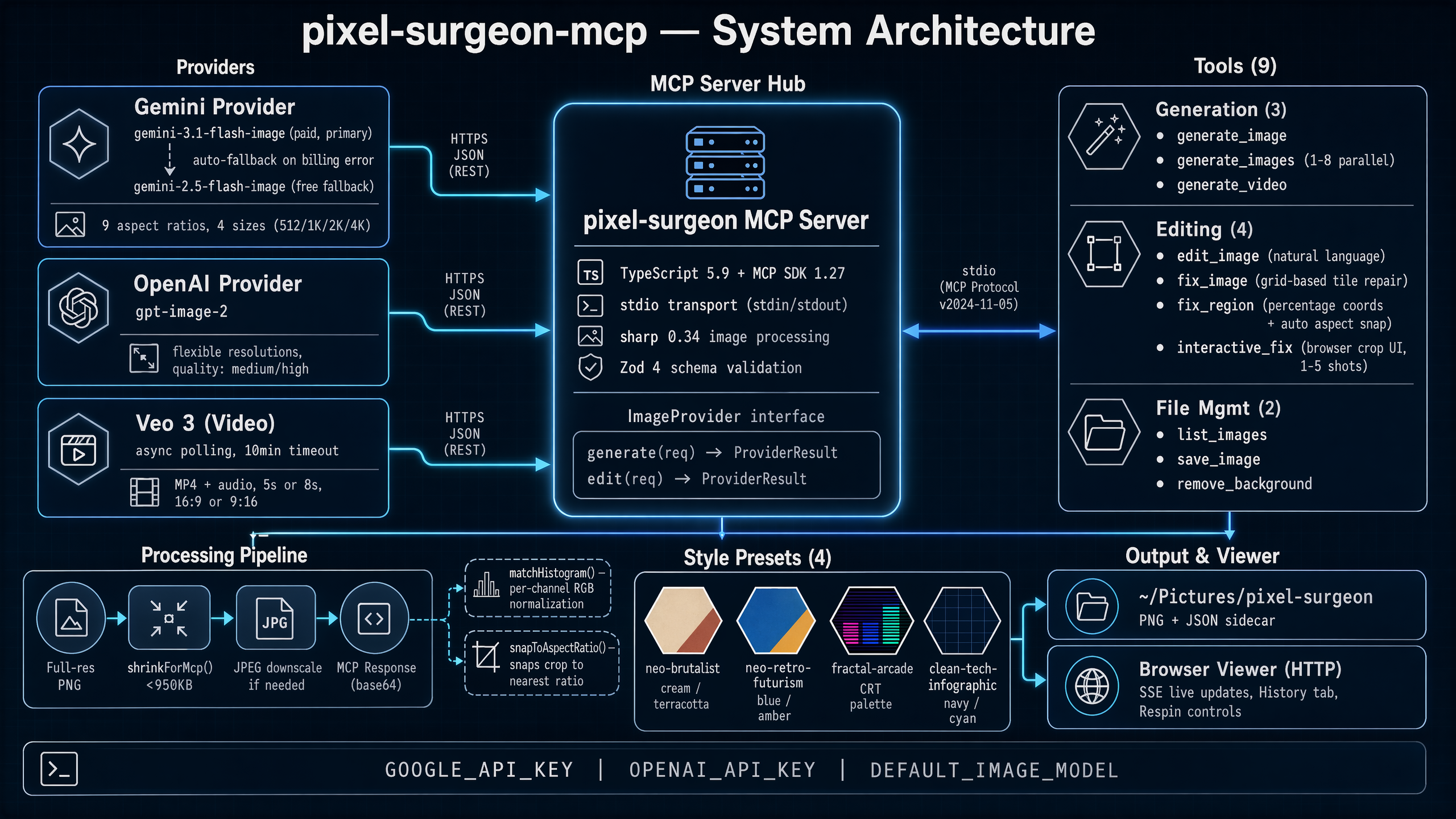
pixel-surgeon-mcp architecture

pixel-surgeon-mcp

MCP server for AI image & video generation, editing, and transplant-grade region repair
Powered by Gemini 3.1 Flash Image, OpenAI GPT Image 2, Grok Imagine, and Veo 3


MCP stdio Gemini OpenAI Grok Veo 3 TypeScript


An MCP server that gives Claude (or any MCP client) the ability to generate images, edit them, fix garbled text, and create videos — all through natural language.

How it works

pixel-surgeon-mcp is a multi-provider image generation server. You can use any combination of providers and switch between them per-request:

Gemini (Google) — balanced

Google's image generation pipeline uses a two-stage approach: Gemini 3.1 Pro reasons about your prompt, then Gemini 3.1 Flash Image renders the pixels. Supports 9 aspect ratios at 512/1K/2K/4K resolution. Best price/performance ratio, with a free tier available.

OpenAI GPT Image 2 — highest quality

OpenAI's latest image model with dramatically improved text rendering and visual fidelity. Supports flexible resolutions — pixel-surgeon maps your chosen size and aspect ratio to the optimal pixel dimensions automatically. Quality levels: medium (fast) and high (print-ready). Excellent for infographics, diagrams, and text-heavy images where other models struggle. Slower and more expensive.

Инструменты были проиндексированы:
edit_image

Редактировать существующее изображение. Поддерживает модели Gemini и OpenAI - передайте параметр model для выбора. Укажите имя файла изображения в /root/Pictures/pixel-surgeon (используйте list_images, чтобы увидеть доступные файлы, или save_image, чтобы сначала импортировать изображение). MCP читает файл напрямую - НЕ передавайте данные изображения в формате base64.

Параметры
  • aspect_ratioenum

    Aspect ratio for the output image

  • filenamestringобязательный

    Filename of the source image in /root/Pictures/pixel-surgeon (e.g. "2026-03-17T17-47-31-152Z_59f735df.png")

  • image_sizeenum

    Output image resolution

  • modelenum

    Model to use. Available: 'gemini-3.1-flash-image' (Gemini 3.1 Flash Image), 'gemini-2.5-flash-image' (Gemini 2.5 Flash Image), 'gpt-image-1' (GPT Image 1 (OpenAI)), 'gpt-image-2' (GPT Image 2 (OpenAI)), 'grok-imagine' (Grok Imagine (xAI)). Default: 'gpt-image-2'. Set DEFAULT_IMAGE_MODEL env var to change the default. Provider tradeoffs: grok-imagine is fastest and cheapest; gemini is mid-quality with the best price/performance ratio (free tier available); gpt-image-2 is highest quality but slower and more expensive. Gemini models fall back to free tier on billing errors. OpenAI requires OPENAI_API_KEY. Grok requires XAI_API_KEY.

  • promptstringобязательный

    Text prompt describing the edits to make to the image

  • styleenum

    Optional style preset to apply. When set, the style's prompt prefix is prepended and its default aspect ratio is used (unless you explicitly set one). Available styles: • neo-brutalist — Neo-brutalist minimalist magazine editorial. Bold oversized typography, cream/black/terracotta palette, halftone textures, visible grid lines, asymmetric layout. Think Emigre meets Swiss brutalism. • retro-futuristic-arcade — Retro-futurist infographic style. 1960s Space Age optimism meets 1980s arcade aesthetics. Cathode blue, warm amber, salmon red, warm green palette. CRT scanlines, atomic-age geometry, pixel-grid accents. Great for diagrams, system overviews, and technical illustrations. • fractal-arcade — Geometric dithered fractal style. All shading via dithering patterns and geometric cross-hatch grids — no smooth gradients. Fractal backgrounds (Sierpinski, hexagonal tessellations, recursive diamonds), low-poly faceted subjects, retro CRT palette. • duval-software-infographic — Duval Software's clean technical infographic for architecture diagrams, system flows, and data pipelines. Dark navy background, cyan/electric blue glowing connection lines, geometric nodes, professional and precise.

fix_image

Починить изображение с глючным или искажённым текстом: разбей картинку на тайлы, перерендерь каждый тайл отдельно, а потом склей обратно. Метод работает за счёт того, что в маленьких фрагментах текста меньше, и модель справляется с ними лучше. Используй этот подход, когда на сгенерированной картинке видны текстовые артефакты или перегруженные текстовые области.

Параметры
  • filenamestringобязательный

    Filename of the source image in /root/Pictures/pixel-surgeon

  • gridenum

    How to split the image: cols x rows

  • image_sizeenum

    Resolution for each tile

  • modelenum

    Model to use. Available: 'gemini-3.1-flash-image' (Gemini 3.1 Flash Image), 'gemini-2.5-flash-image' (Gemini 2.5 Flash Image), 'gpt-image-1' (GPT Image 1 (OpenAI)), 'gpt-image-2' (GPT Image 2 (OpenAI)), 'grok-imagine' (Grok Imagine (xAI)). Default: 'gpt-image-2'. Set DEFAULT_IMAGE_MODEL env var to change the default. Provider tradeoffs: grok-imagine is fastest and cheapest; gemini is mid-quality with the best price/performance ratio (free tier available); gpt-image-2 is highest quality but slower and more expensive. Gemini models fall back to free tier on billing errors. OpenAI requires OPENAI_API_KEY. Grok requires XAI_API_KEY.

  • promptstring

    Instructions for fixing each tile

fix_region

Вырезает конкретную область изображения, отправляет её на исправление и вставляет обратно. Обрезка автоматически привязывается к ближайшему поддерживаемому соотношению сторон. Используй, когда только часть изображения содержит битый текст или артефакты — точнее, чем сеточный подход в fix_image.

Параметры
  • filenamestringобязательный

    Filename of the source image in /root/Pictures/pixel-surgeon

  • heightnumberобязательный

    Height of region as percentage of image height (1-100)

  • image_sizeenum

    Resolution for the cropped region

  • modelenum

    Model to use. Available: 'gemini-3.1-flash-image' (Gemini 3.1 Flash Image), 'gemini-2.5-flash-image' (Gemini 2.5 Flash Image), 'gpt-image-1' (GPT Image 1 (OpenAI)), 'gpt-image-2' (GPT Image 2 (OpenAI)), 'grok-imagine' (Grok Imagine (xAI)). Default: 'gpt-image-2'. Set DEFAULT_IMAGE_MODEL env var to change the default. Provider tradeoffs: grok-imagine is fastest and cheapest; gemini is mid-quality with the best price/performance ratio (free tier available); gpt-image-2 is highest quality but slower and more expensive. Gemini models fall back to free tier on billing errors. OpenAI requires OPENAI_API_KEY. Grok requires XAI_API_KEY.

  • promptstring

    Instructions for fixing the selected region

  • widthnumberобязательный

    Width of region as percentage of image width (1-100)

  • xnumberобязательный

    Left edge of region as percentage of image width (0-100)

  • ynumberобязательный

    Top edge of region as percentage of image height (0-100)

generate_image

Генерирует одно изображение. Поддерживает модели Gemini и OpenAI: передайте параметр model, чтобы выбрать. Изображение в полном разрешении доступно для просмотра в браузере.

Параметры
  • aspect_ratioenum

    Aspect ratio for the image

  • image_sizeenum

    Image resolution

  • modelenum

    Model to use. Available: 'gemini-3.1-flash-image' (Gemini 3.1 Flash Image), 'gemini-2.5-flash-image' (Gemini 2.5 Flash Image), 'gpt-image-1' (GPT Image 1 (OpenAI)), 'gpt-image-2' (GPT Image 2 (OpenAI)), 'grok-imagine' (Grok Imagine (xAI)). Default: 'gpt-image-2'. Set DEFAULT_IMAGE_MODEL env var to change the default. Provider tradeoffs: grok-imagine is fastest and cheapest; gemini is mid-quality with the best price/performance ratio (free tier available); gpt-image-2 is highest quality but slower and more expensive. Gemini models fall back to free tier on billing errors. OpenAI requires OPENAI_API_KEY. Grok requires XAI_API_KEY.

  • promptstringобязательный

    Text prompt describing the image to generate

  • styleenum

    Optional style preset to apply. When set, the style's prompt prefix is prepended and its default aspect ratio is used (unless you explicitly set one). Available styles: • neo-brutalist — Neo-brutalist minimalist magazine editorial. Bold oversized typography, cream/black/terracotta palette, halftone textures, visible grid lines, asymmetric layout. Think Emigre meets Swiss brutalism. • retro-futuristic-arcade — Retro-futurist infographic style. 1960s Space Age optimism meets 1980s arcade aesthetics. Cathode blue, warm amber, salmon red, warm green palette. CRT scanlines, atomic-age geometry, pixel-grid accents. Great for diagrams, system overviews, and technical illustrations. • fractal-arcade — Geometric dithered fractal style. All shading via dithering patterns and geometric cross-hatch grids — no smooth gradients. Fractal backgrounds (Sierpinski, hexagonal tessellations, recursive diamonds), low-poly faceted subjects, retro CRT palette. • duval-software-infographic — Duval Software's clean technical infographic for architecture diagrams, system flows, and data pipelines. Dark navy background, cyan/electric blue glowing connection lines, geometric nodes, professional and precise.

generate_images

Генерирует несколько изображений параллельно. Поддерживает модели Gemini и OpenAI — передай параметр model, чтобы выбрать. Возвращает сгенерированные изображения и любой сопроводительный текст. Изображения в полном разрешении можно посмотреть в браузере.

Параметры
  • aspect_ratioenum

    Aspect ratio for all generated images

  • image_sizeenum

    Image resolution

  • modelenum

    Model to use. Available: 'gemini-3.1-flash-image' (Gemini 3.1 Flash Image), 'gemini-2.5-flash-image' (Gemini 2.5 Flash Image), 'gpt-image-1' (GPT Image 1 (OpenAI)), 'gpt-image-2' (GPT Image 2 (OpenAI)), 'grok-imagine' (Grok Imagine (xAI)). Default: 'gpt-image-2'. Set DEFAULT_IMAGE_MODEL env var to change the default. Provider tradeoffs: grok-imagine is fastest and cheapest; gemini is mid-quality with the best price/performance ratio (free tier available); gpt-image-2 is highest quality but slower and more expensive. Gemini models fall back to free tier on billing errors. OpenAI requires OPENAI_API_KEY. Grok requires XAI_API_KEY.

  • promptsstring[]обязательный

    Array of text prompts, one per image to generate (1-8 images)

  • styleenum

    Optional style preset to apply. When set, the style's prompt prefix is prepended and its default aspect ratio is used (unless you explicitly set one). Available styles: • neo-brutalist — Neo-brutalist minimalist magazine editorial. Bold oversized typography, cream/black/terracotta palette, halftone textures, visible grid lines, asymmetric layout. Think Emigre meets Swiss brutalism. • retro-futuristic-arcade — Retro-futurist infographic style. 1960s Space Age optimism meets 1980s arcade aesthetics. Cathode blue, warm amber, salmon red, warm green palette. CRT scanlines, atomic-age geometry, pixel-grid accents. Great for diagrams, system overviews, and technical illustrations. • fractal-arcade — Geometric dithered fractal style. All shading via dithering patterns and geometric cross-hatch grids — no smooth gradients. Fractal backgrounds (Sierpinski, hexagonal tessellations, recursive diamonds), low-poly faceted subjects, retro CRT palette. • duval-software-infographic — Duval Software's clean technical infographic for architecture diagrams, system flows, and data pipelines. Dark navy background, cyan/electric blue glowing connection lines, geometric nodes, professional and precise.

generate_video

Генерирует видео с помощью Google Veo 3. Возвращает видеофайл в формате MP4. Генерация занимает 1-3 минуты — инструмент будет опрашивать сервер до завершения. Veo 3 создаёт как видео, так и фоновый звук. Видео сохраняются в общую папку и доступны для просмотра во встроенном плеере браузера.

Параметры
  • aspect_ratioenum

    Aspect ratio — 16:9 for landscape, 9:16 for portrait/vertical

  • durationenum

    Video duration in seconds

  • promptstringобязательный

    Text prompt describing the video to generate. Be descriptive about motion, camera angles, lighting, and scene details for best results.

interactive_fix

Открывает изображение в браузерном инструменте для обрезки: пользователь рисует прямоугольник вокруг области для исправления, добавляет заметки или инструкции и отправляет. Инструмент ждёт выбора пользователя, затем отправляет обрезанную область на восстановление и встраивает её обратно в исходное изображение. Лучше всего подходит для точных исправлений под контролем пользователя.

Параметры
  • filenamestringобязательный

    Filename of the source image in /root/Pictures/pixel-surgeon

  • image_sizeenum

    Resolution for the cropped region

  • modelenum

    Model to use. Available: 'gemini-3.1-flash-image' (Gemini 3.1 Flash Image), 'gemini-2.5-flash-image' (Gemini 2.5 Flash Image), 'gpt-image-1' (GPT Image 1 (OpenAI)), 'gpt-image-2' (GPT Image 2 (OpenAI)), 'grok-imagine' (Grok Imagine (xAI)). Default: 'gpt-image-2'. Set DEFAULT_IMAGE_MODEL env var to change the default. Provider tradeoffs: grok-imagine is fastest and cheapest; gemini is mid-quality with the best price/performance ratio (free tier available); gpt-image-2 is highest quality but slower and more expensive. Gemini models fall back to free tier on billing errors. OpenAI requires OPENAI_API_KEY. Grok requires XAI_API_KEY.

list_images

Выведи список файлов изображений и видео в общей директории pixel-surgeon (/root/Pictures/pixel-surgeon). Используй это, чтобы найти доступные для редактирования изображения.

Параметры

Без параметров.

remove_background

Удаляет фоновый цвет из изображения и делает его прозрачным. Выводит PNG с альфа-каналом. Изображение должно уже находиться в /root/Pictures/pixel-surgeon (сначала используйте save_image, чтобы импортировать его).

Параметры
  • colorstring

    Target background color as hex (e.g. "#FFFFFF" for white, "#000000" for black, "#FF0000" for red). Default: white.

  • filenamestringобязательный

    Filename of the source image in /root/Pictures/pixel-surgeon

  • thresholdnumber

    How far from the target color a pixel can be and still count as background (0 = exact match only, 30 = default, higher = more aggressive)

save_image

Копирует файл изображения в общую директорию pixel-surgeon (/root/Pictures/pixel-surgeon), чтобы его можно было использовать с edit_image. Используйте это, когда пользователь хочет отредактировать изображение, находящееся в другом месте его файловой системы.

Параметры
  • source_pathstringобязательный

    Absolute path to the image file to import

trace_to_svg

Конвертирует растровое изображение в SVG с помощью векторизации potrace. Лучше всего подходит для штриховых рисунков, диаграмм, логотипов и изображений с высоким контрастом. Изображение уже должно находиться в /root/Pictures/pixel-surgeon (сначала воспользуйтесь save_image для импорта).

Параметры
  • filenamestringобязательный

    Filename of the source image in /root/Pictures/pixel-surgeon

  • invertboolean

    Invert the image before tracing (useful for light-on-dark images)

  • thresholdnumber

    Brightness threshold for black/white conversion (0-255). Lower = more black. -1 = auto-detect. Default: auto.

  • turdsizenumber

    Suppress speckles up to this size (in pixels). Default: 2.

Похожие MCP-сервера

AceDataCloud/MCPSeedream

AceDataCloud/MCPSeedream

MCP-сервер для генерации и редактирования изображений с помощью моделей ByteDance Seedream. Используйте текстовые запросы на русском или английском, меняйте стиль и фон, управляйте разрешением и se...

Python3
nanana-app/mcp-server-nano-banana

nanana-app/mcp-server-nano-banana

MCP-сервер для генерации и трансформации изображений через Nanana AI с моделью Google Gemini nano banana. Позволяет Claude Desktop создавать картинки по тексту и редактировать существующие. Полезен...

JavaScript10
Amazon Bedrock Nova Canvas

Amazon Bedrock Nova Canvas

MCP сервер для генерации изображений через Amazon Bedrock и модель Nova Canvas. Создает качественные картинки по тексту, поддерживает негативные промпты, настройку разрешения и seed. Полезен разработчикам AI-решений на AWS.

JavaScript24
AceDataCloud/MCPFlux

AceDataCloud/MCPFlux

MCP сервер FluxMCP подключает генерацию и редактирование AI-изображений Flux к любым MCP-клиентам. Создавайте и дорабатывайте картинки текстовыми запросами, работайте локально или облачно, 7 моделей.

Python3
forgemeshlabs/imagegen-mcp

forgemeshlabs/imagegen-mcp

MCP сервер для генерации изображений с оплатой в USDC через x402. Создавайте картинки, удаляйте фон и повышайте разрешение до 4K без API ключа. Вызов одним запросом - для автономных агентов и разра...

JavaScript1
strato-space/media-gen-mcp

strato-space/media-gen-mcp

Строго типизированный MCP сервер для генерации изображений (OpenAI gpt-image) и видео (Sora, Veo). Поддерживает редактирование, загрузку с URL и диска, сжатие. Интегрируется с любыми MCP-клиентами.

TypeScript9
© Каталог MCP, 2026. Все права защищены.
Проект не аффилирован с Anthropic и любыми упомянутыми продуктами.
Все названия и торговые марки принадлежат их владельцам.
Контакты для связи: hi@mcp-katalog.ru

Лука Никитин


