



aliasunder/vault-cortex

aliasunder/vault-cortex

от aliasunder
Сервер Vault Cortex предоставляет AI-ассистентам полнотекстовый поиск и структурированную память в Obsidian vault через Docker. 25 инструментов работают с заметками, ссылками и свойствами без плагинов.

Vault Cortex

CI Gitleaks Trivy GitHub Release npm OpenSSF Scorecard OpenSSF Best Practices Ask DeepWiki vault-cortex MCP server

Vault Cortex is a standalone MCP server that gives any AI agent hybrid search, task management, structured memory, and read/write access to your Obsidian vault. No plugins, no running Obsidian, no separate bridge. One Docker container, your vault folder, a full tool suite + guided prompts. Run it on a remote server with Obsidian Sync, and the same vault is accessible from your phone, claude.ai, or any remote MCP client, secured with OAuth 2.1. Deploy it with one click or self-host it; either way, the vault is always yours.

Contents — What you get · Quick Start · How It Works · Hybrid Search · Memory · Tasks · Files · Tools · Prompts · Properties · Config · Daily Notes · Data Integrity · Auth · Deployment · One-click Deploy · Community Deployments

What you get

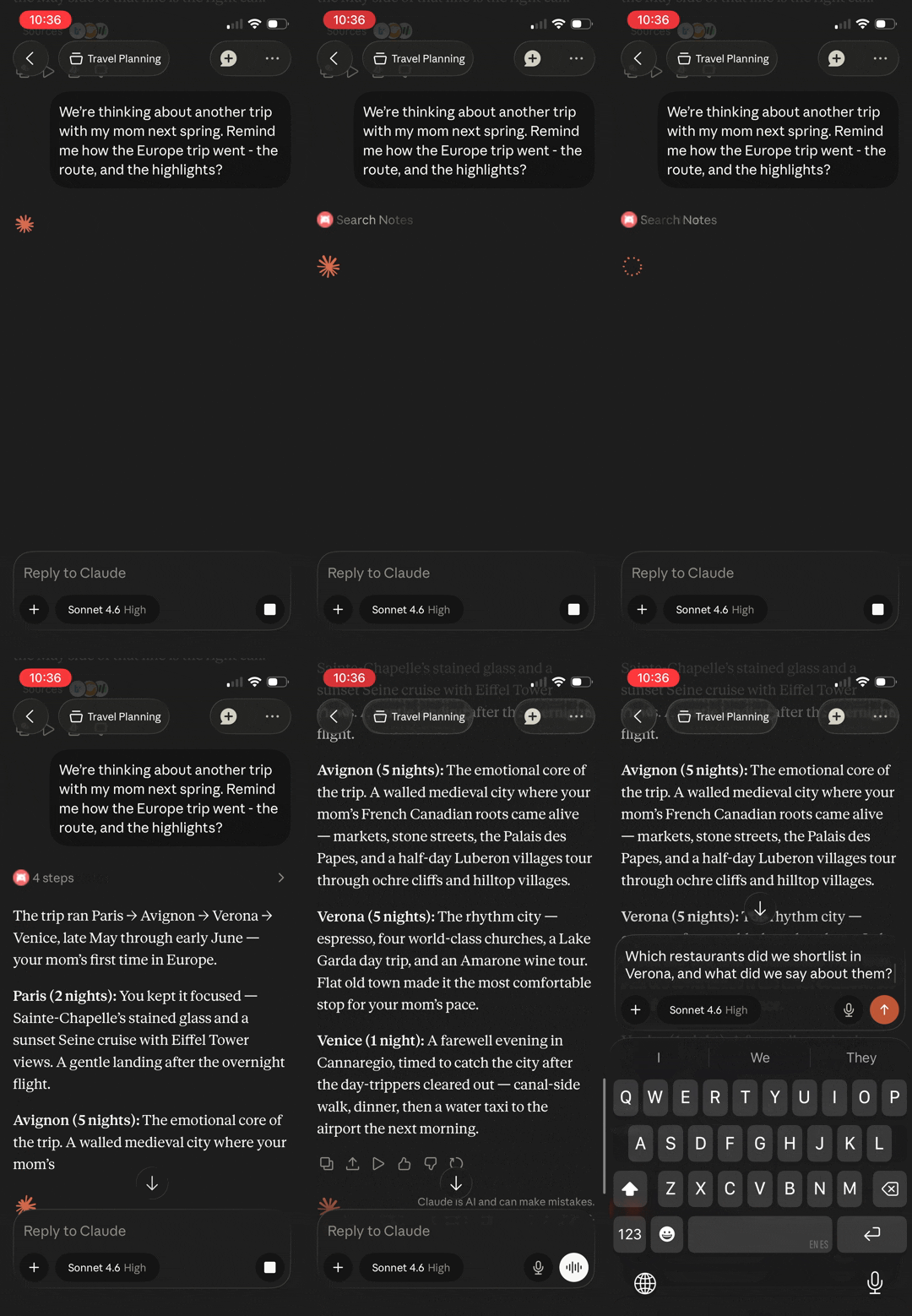
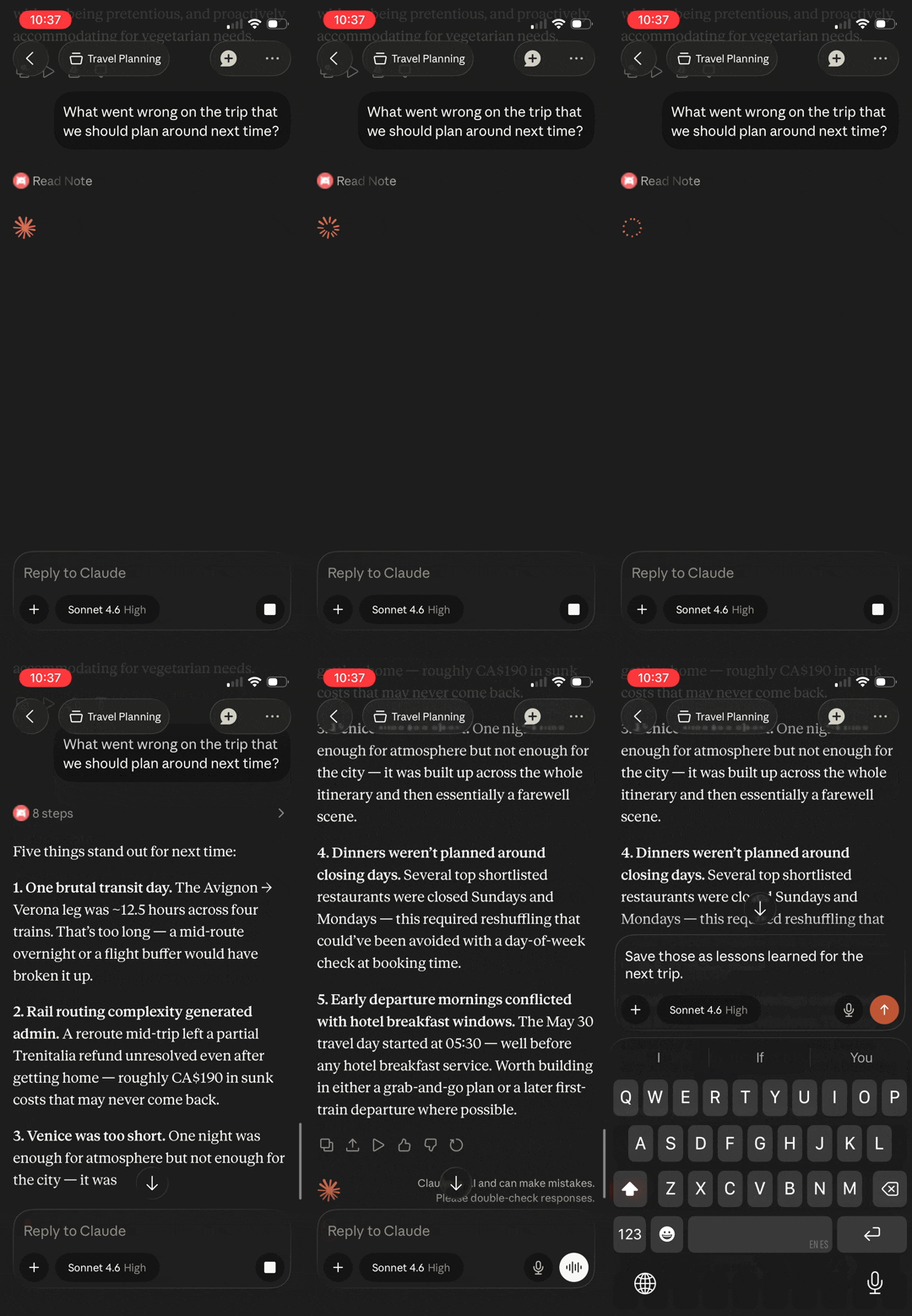
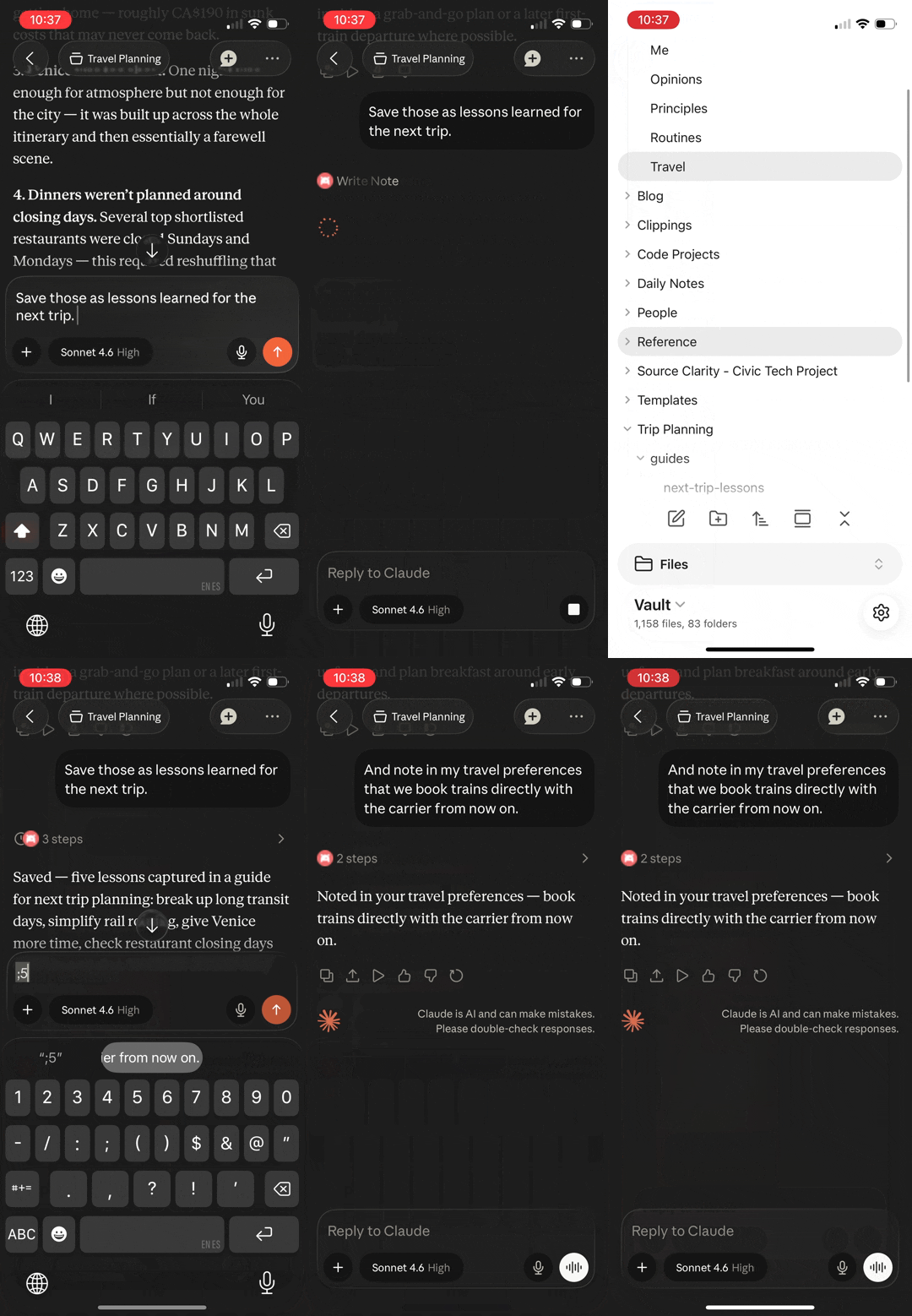
Search the vault Reason over notes Write back to Obsidian
Ask Claude about a past trip — it searches the vault and recalls the route, cities, and highlights Ask what went wrong — Claude synthesizes lessons from session logs and itinerary notes Save lessons learned to the vault, update travel preferences, then see both in Obsidian

All three demos run on Claude mobile. The vault is on a remote server, not the phone.

  • Remote access — works from your phone, a remote server, or any MCP client via OAuth 2.1. One click on Render or Railway gets you there with no server to manage; a VPS works too.
  • Plugin-free — Obsidian doesn't need to be running. The server works directly with .md files on disk. Headless sync keeps the vault current.
  • Hybrid search — FTS5 keyword matching + vector semantic similarity via RRF fusion, refined by cross-encoder reranking for intent-heavy queries. Keywords stay precise on exact terms and jargon; vectors find notes even when your words differ from the vault's.
  • Structured memory — dated, append-only entries accumulate into a personal knowledge layer, auto-initialized for AI personalization. Topic recall answers "what do I think about X?" with the current take and the dated history behind it — evolution included.
  • Tasks — Kanban-aware task queries and updates: triage by status, dates, or priority, then complete, reprioritize, or move tasks between lanes in one call. Completing a recurring task spawns its next occurrence. Parses both Tasks plugin emoji and Dataview inline-field formats.
  • Link graph — backlinks, outgoing links, and orphan detection across the vault
  • Files — read the vault's non-markdown files too: images arrive as actual images (shrunk to fit when needed), PDFs as structured text or rendered pages, canvases as readable outlines, data files as text
  • Obsidian-native — understands frontmatter, wikilinks, tags, headings, and daily notes
  • Guided workflows — built-in prompts for vault health, memory review, and daily reconciliation — assembled from live vault data each time
У этого сервера пока нет списка инструментов.
0.15.1основная
0.15.0
0.14.5
0.14.4
0.14.3
0.14.2
0.14.1
0.14.0
0.13.5
0.13.4
0.13.3
0.13.2
0.13.1
0.13.0
0.12.1
0.12.0
0.11.0
0.10.0
0.9.0
0.8.7
0.8.6
0.8.5
0.8.4
0.8.3
0.8.2
0.8.1
0.8.0
0.7.0
0.6.0
0.5.0
0.4.1
0.4.0
0.3.3
0.3.2
0.3.1
0.3.0
0.2.7
0.2.6
0.2.5
0.2.4
0.2.3
0.2.2
0.2.1
0.2.0
0.1.49
0.1.48
0.1.47
0.1.46
0.1.45
0.1.44
0.1.43
0.1.42
0.1.41
0.1.40
0.1.39
0.1.38
0.1.37
0.1.36
0.1.35
0.1.34
0.1.33
0.1.32
0.1.31
0.1.30
0.1.29
0.1.28
0.1.27
0.1.26
0.1.25
0.1.24
0.1.23
0.1.22
0.1.21
0.1.20
0.1.19
0.1.18
0.1.17
0.1.16
0.1.15
0.1.14
0.1.13
0.1.12
0.1.9
0.1.8
0.1.7
0.1.6
0.1.5
0.1.4
0.1.3
0.1.2
0.1.1
0.1.0
0.1.0-2
0.1.0-1
0.1.0-0
0.0.22
0.0.21
0.0.20
0.0.19
0.0.18
0.0.17
0.0.16
0.0.15
0.0.14
0.0.13
0.0.12
0.0.11
0.0.10
0.0.10-3
0.0.10-2
0.0.10-1
0.0.10-0
0.0.9
0.0.8
0.0.8-0
0.0.7
0.0.6
0.0.5
0.0.5-0
0.0.4
0.0.3
0.0.2
0.0.1

Выберите клиент, чтобы установить aliasunder/vault-cortex:

Любой клиент

Конфиг добавления MCP сервера стандартный, обычно он не меняется вообще, поэтому подходит практически к любому ИИ клиенту, поддерживающему MCP.

{
  "mcpServers": {
    "aliasunder-vault-cortex-u5e83ej472": {
      "command": "npx",
      "args": [
        "-y",
        "mcp-remote",
        "http://localhost:8000/mcp",
        "--header",
        "Authorization: Bearer <your MCP_AUTH_TOKEN>"
      ]
    }
  }
}
CursorCursor

Перейдите по ссылке и сервер автоматически будет добавлен в Cursor. Либо откройте/создайте файл ~/.cursor/mcp.json(%USERPROFILE%\.cursor\mcp.json на Windows) и добавьте конфиг сервера:

{
  "mcpServers": {
    "aliasunder-vault-cortex-u5e83ej472": {
      "command": "npx",
      "args": [
        "-y",
        "mcp-remote",
        "http://localhost:8000/mcp",
        "--header",
        "Authorization: Bearer <your MCP_AUTH_TOKEN>"
      ]
    }
  }
}
VS Code

Создайте .vscode/mcp.json в проекте (ключ верхнего уровня — servers):

{
  "servers": {
    "aliasunder-vault-cortex-u5e83ej472": {
      "type": "stdio",
      "command": "npx",
      "args": [
        "-y",
        "mcp-remote",
        "http://localhost:8000/mcp",
        "--header",
        "Authorization: Bearer <your MCP_AUTH_TOKEN>"
      ]
    }
  }
}

Либо добавьте сервер через терминал:

code --add-mcp "{\"name\":\"aliasunder-vault-cortex-u5e83ej472\",\"type\":\"stdio\",\"command\":\"npx\",\"args\":[\"-y\",\"mcp-remote\",\"http://localhost:8000/mcp\",\"--header\",\"Authorization: Bearer <your MCP_AUTH_TOKEN>\"]}"
ClaudeClaude Desktop

Откройте Settings → Developer → Edit Config — это откроет файл claude_desktop_config.json:

  • macOS: ~/Library/Application Support/Claude/claude_desktop_config.json
  • Windows: %APPDATA%\Claude\claude_desktop_config.json

Впишите сервер и полностью перезапустите Claude Desktop:

{
  "mcpServers": {
    "aliasunder-vault-cortex-u5e83ej472": {
      "command": "npx",
      "args": [
        "-y",
        "mcp-remote",
        "http://localhost:8000/mcp",
        "--header",
        "Authorization: Bearer <your MCP_AUTH_TOKEN>"
      ]
    }
  }
}
Claude CodeClaude Code

Добавьте сервер одной командой в терминале:

claude mcp add aliasunder-vault-cortex-u5e83ej472 -- npx -y mcp-remote http://localhost:8000/mcp --header Authorization: Bearer <your MCP_AUTH_TOKEN>

Либо через JSON-конфиг:

claude mcp add-json aliasunder-vault-cortex-u5e83ej472 "{\"command\":\"npx\",\"args\":[\"-y\",\"mcp-remote\",\"http://localhost:8000/mcp\",\"--header\",\"Authorization: Bearer <your MCP_AUTH_TOKEN>\"]}"
CodexCodex

Добавьте сервер командой в терминале:

codex mcp add aliasunder-vault-cortex-u5e83ej472 -- npx -y mcp-remote http://localhost:8000/mcp --header Authorization: Bearer <your MCP_AUTH_TOKEN>

Либо вручную в ~/.codex/config.toml(%USERPROFILE%\.codex\config.toml на Windows):

[mcp_servers.aliasunder-vault-cortex-u5e83ej472]
command = "npx"
args = ["-y", "mcp-remote", "http://localhost:8000/mcp", "--header", "Authorization: Bearer <your MCP_AUTH_TOKEN>"]
PerplexityPerplexity

MCP доступен подписчикам Perplexity Pro / Max / Enterprise. Локальные серверы — только в приложении для macOS.

  1. Откройте Настройки аккаунта → Connectors.
  2. Установите вспомогательное приложение PerplexityXPC (один раз).
  3. Нажмите Add Connector → вкладка Simple.
  4. В поле Server Name укажите aliasunder/vault-cortex, а в поле команды запуска — строку ниже:
npx -y mcp-remote http://localhost:8000/mcp --header Authorization: Bearer <your MCP_AUTH_TOKEN>

Нажмите Save и дождитесь статуса Running.

WindsurfWindsurf

Откройте Windsurf Settings → Cascade → MCP Servers или отредактируйте файл ~/.codeium/windsurf/mcp_config.json:

{
  "mcpServers": {
    "aliasunder-vault-cortex-u5e83ej472": {
      "command": "npx",
      "args": [
        "-y",
        "mcp-remote",
        "http://localhost:8000/mcp",
        "--header",
        "Authorization: Bearer <your MCP_AUTH_TOKEN>"
      ]
    }
  }
}
ClineCline

В панели Cline нажмите иконку MCP Servers → Configure → Configure MCP Servers (или отредактируйте ~/.cline/mcp.json) и добавьте сервер:

{
  "mcpServers": {
    "aliasunder-vault-cortex-u5e83ej472": {
      "command": "npx",
      "args": [
        "-y",
        "mcp-remote",
        "http://localhost:8000/mcp",
        "--header",
        "Authorization: Bearer <your MCP_AUTH_TOKEN>"
      ],
      "disabled": false,
      "autoApprove": []
    }
  }
}
Continue

Создайте файл в .continue/mcpServers/ (например aliasunder-vault-cortex-u5e83ej472.yaml) или добавьте блок в config.yaml. MCP работает только в режиме agent:

mcpServers:
  - name: aliasunder-vault-cortex-u5e83ej472
    command: npx
    args:
      - "-y"
      - "mcp-remote"
      - "http://localhost:8000/mcp"
      - "--header"
      - "Authorization: Bearer <your MCP_AUTH_TOKEN>"
Zed

Выполните agent: add context server или откройте настройки (zed: open settings file) и добавьте сервер в объект context_servers:

{
  "context_servers": {
    "aliasunder-vault-cortex-u5e83ej472": {
      "command": "npx",
      "args": [
        "-y",
        "mcp-remote",
        "http://localhost:8000/mcp",
        "--header",
        "Authorization: Bearer <your MCP_AUTH_TOKEN>"
      ]
    }
  }
}

Похожие MCP-сервера

MarkusPfundstein/mcp-obsidian

MarkusPfundstein/mcp-obsidian

от markuspfundstein

Управляет заметками Obsidian: ищет по ключевым словам, читает, дополняет и создаёт новые. Требуется плагин Local REST API.

Python⭐ 4482
louis030195/easy-obsidian-mcp

louis030195/easy-obsidian-mcp

от louis030195

MCP-сервер для подключения AI-ассистентов (Claude, ChatGPT) к Obsidian: поиск, чтение и анализ связей между заметками. Полезен для пользователей Obsidian, которые хотят задействовать ИИ для работы ...

TypeScript⭐ 17
mlorentedev/hive

mlorentedev/hive

от mlorentedev

Hive — MCP-сервер, который подключает AI-ассистента к Obsidian-хранилищу. Вместо загрузки всего контекста он запрашивает только нужное, экономя токены и сохраняя знания между сессиями. Полезен разр...

Python⭐ 11
smith-and-web/obsidian-mcp-server

smith-and-web/obsidian-mcp-server

от smith-and-web

MCP-сервер для интеграции AI-ассистентов с Obsidian: создавайте, читайте, редактируйте заметки, управляйте тегами и ищите по хранилищу через естественный язык. Полезен для автоматизации работы с за...

TypeScript⭐ 19
sgx-labs/statelessagent

sgx-labs/statelessagent

от sgx-labs

MCP сервер SAME даёт AI-агентам кодинга постоянную память: индексирует markdown-заметки, автоматически подбирает контекст после перезапуска и фиксирует решения. Работает локально с Claude Code, Cursor, Windsurf и другими. Без облаков и телеметрии.

Go⭐ 24
basicmachines-co/basic-memory

basicmachines-co/basic-memory

от basicmachines-co

Basic Memory хранит заметки в Markdown-файлах, ищет по смыслу, связывает идеи в граф. Данные не покидают диск, работает офлайн.

Python⭐ 4283
© Каталог MCP, 2026. Все права защищены.
Проект не аффилирован с Anthropic и любыми упомянутыми продуктами.
Все названия и торговые марки принадлежат их владельцам.
Контакты для связи: hi@mcp-katalog.ru

Лука Никитин